顯示具有 Cacti 標籤的文章。 顯示所有文章

2023年3月5日 星期日

Cacti + LINE Notify

 [root@rocky9 thold]# cat /etc/redhat-release 

Rocky Linux release 9.1 (Blue Onyx)

[root@rocky9 thold]# php -v 

PHP 7.4.33 (cli) (built: Feb 14 2023 09:05:10) ( NTS )

Copyright (c) The PHP Group

Zend Engine v3.4.0, Copyright (c) Zend Technologies

    with Zend OPcache v7.4.33, Copyright (c), by Zend Technologies

[root@rocky9 thold]# mysql

Welcome to the MariaDB monitor.  Commands end with ; or \g.

Your MariaDB connection id is 2293

Server version: 10.5.16-MariaDB MariaDB Server


Copyright (c) 2000, 2018, Oracle, MariaDB Corporation Ab and others.


Type 'help;' or '\h' for help. Type '\c' to clear the current input statement.


MariaDB [(none)]> exit

Bye

[root@rocky9 thold]# 

=======================

Cacti ver 1.2.24

Thresholds 1.7

=======================

vi /var/www/html/cacti/plugins/thold/thold_functions.php


Row 5456 Insert :

    shell_exec("curl -X POST https://notify-api.line.me/api/notify -H 'Authorization: Bearer LineNotifyTokenXXXXXXXXXXXXXXXXXXXXXXXXXXXX' -F 'message=$subject \n\n'");


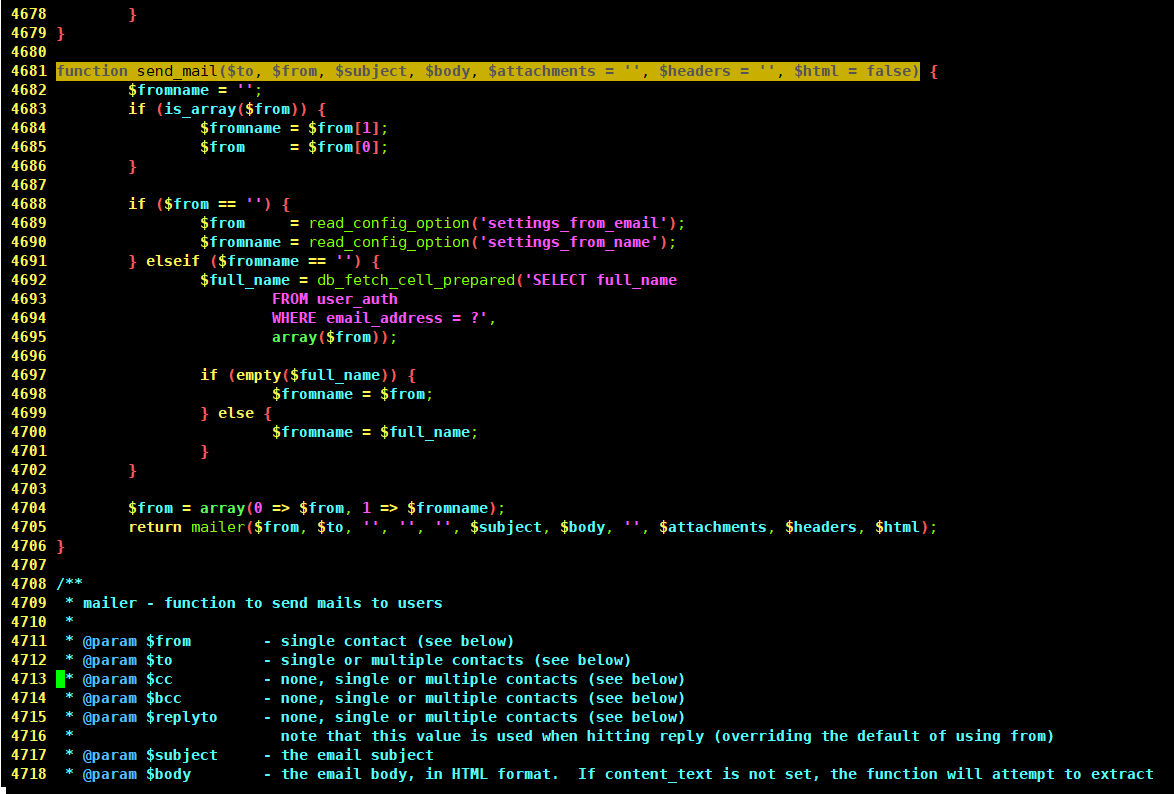
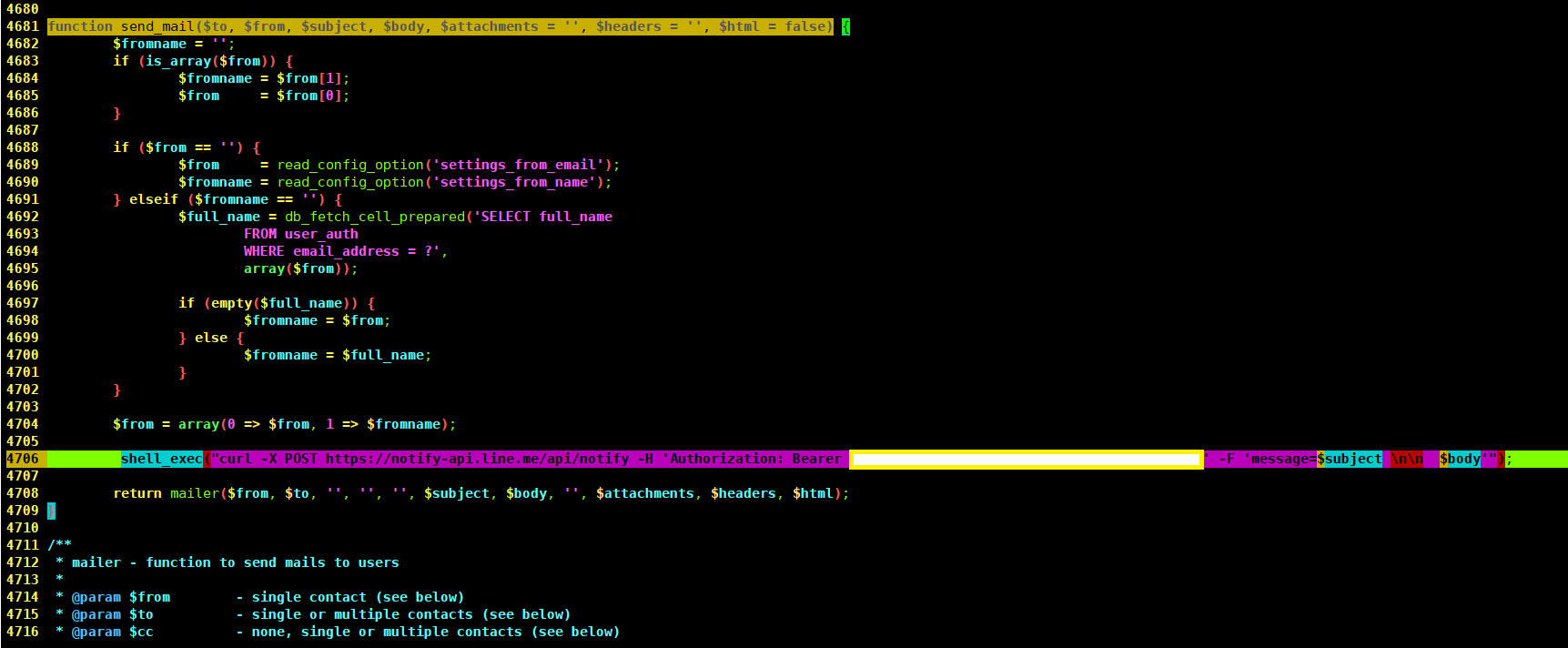
vi /var/www/html/cacti/lib/functions.php


Row 4705 Insert :

 shell_exec("curl -X POST https://notify-api.line.me/api/notify -H 'Authorization: Bearer LineNotifyTokenXXXXXXXXXXXXXXXXXXXXXXXXXXXX' -F 'message=$subject \n\n  $body'");


Advanced DEMO


2017年9月21日 星期四

cacti plugin thold + Line API Alert


 cacti 0.8.x  + setting plugin (0.71)

# vi /var/www/html/cacti/plugins/settings/include/functions.php

function send_mail($to, $from, $subject, $message, $filename = '', $headers = '') {
....
.....

       // Line API plugin here

        return '';

}

## thold (0.5)

# vi /var/www/html/cacti/plugins/thold/thold_functions.php


function thold_mail($to, $from, $subject, $message, $filename, $headers = '') {
....
.....

       // Line API plugin here

        return '';
}


======================================================

cacti 1.1.x

# vi /var/www/html/cacti/lib/functions.php


function send_mail($to, $from, $subject, $body, $attachments = '', $headers = '', $html = false) {
....
...

// Line API plugin here

        return mailer($from, $to, '', '', '', $subject, $body, '', $attachments, $headers, $html);
}


## thold (1.0.x)


# vi /var/www/html/cacti/plugins/thold/thold_functions.php


function thold_mail($to_email, $from_email, $subject, $message, $filename, $headers = '') {
.......
....

// Line API plugin here

        return '';
}


參考資訊

如何做出 cacti plugin manager + Line API Alert
http://xrcd2.blogspot.tw/2017/01/cacti-plugin-manager-line-api-alert.html

使用 Perl 建立 Line API 運用環境
http://xrcd2.blogspot.tw/2016/12/perl-line-api.html

Line API 使用小筆記
http://www.vlab.com.tw/index.php/forum/21/15572-line-api

本 LAB 參考資訊

CACTI Alert 增加 LineNotify
http://penguinbbs.blogspot.tw/2017/08/cacti-alert-linenotify.html


Demo


Demo2


2017年4月20日 星期四

四論 SNMP OIDs

基礎入門

(1)利用SNMP OIDs 加入 Zabbix 監控
http://xrcd2.blogspot.tw/2012/10/snmp-oids-zabbix.html

(2)再論 SNMP OIDs
http://xrcd2.blogspot.tw/2012/10/snmp-oid.html

(3)三論 SNMP OIDs
http://xrcd2.blogspot.tw/2016/11/snmp-oids.html

(4)四論 SNMP OIDs


本文開始


縁起於 http://www.netadmin.com.tw/article_content.aspx?sn=1702080002
網管人-技術專欄
2017/2/15
透過SNMP Query Index協助管理 資源流量圖表自動產出
Cacti監控報表圖多不愁 批次抓取設備資料繪製
丁光立

因為想多學一點 Cacti 的技巧,所以參考了上述文章,一些觀念,寫成這個小筆記供需要
的人參考,但本文會著重於 Linux (CentOS) 的 snmp 實用指令簡介及運用與
 snmp.conf 的撰寫參考等等.建議在閱讀本文之前,可看參考上述基本門,強化
 snmp 基本觀念.


(1) linux (  CentOS ) snmpd.conf
詳細設定可參考
http://net-snmp.sourceforge.net/docs/man/snmpd.conf.html

為方便使用可參考如下設定,請抄改成個人的使用環境配置.

[root@bbb /]# cat /etc/snmp/snmpd.conf

rocommunity public

#這一行是宣告 MIB 檔的目錄.
#MIBDIRS /usr/share/snmp/mibs:/usr/share/snmp/private-mibs
#這一行是宣告載入所有的 MIB 檔
#MIBS all

#宣告使用 CHECK-R77-MIB及CISCO-QOS-PIB-MIB
mibs +CHECK-R77-MIB:CISCO-QOS-PIB-MIB
#宣告使用 CISCO-MEMORY-POOL-MIB
mibs +CISCO-MEMORY-POOL-MIB

#另一種宣告方式

mibfile /usr/share/snmp/mibs/CHECK-R77-MIB.txt

#其它資訊

sysLocation vlab
sysContact wwww.vlab.com.tw
sysName Cacti

# 其它參考資訊如下 URL
# http://www.net-snmp.org/FAQ.html#How_do_I_add_a_MIB_
# 系統預設的 mibs 的目錄為 /usr/share/snmp/mibs 可將自行下載的 mib 檔放置於此目錄內.


測試一下 本機 liunx 的系統資訊

[root@bbb /]# snmpwalk -v2c -c public localhost system
SNMPv2-MIB::sysDescr.0 = STRING: Linux www.vlab.com.tw 2.6.32-642.11.1.el6.x86_64 #1 SMP Fri Nov 18 19:25:05 UTC 2016 x86_64
SNMPv2-MIB::sysObjectID.0 = OID: NET-SNMP-MIB::netSnmpAgentOIDs.10
DISMAN-EVENT-MIB::sysUpTimeInstance = Timeticks: (11265) 0:01:52.65
SNMPv2-MIB::sysContact.0 = STRING: wwww.vlab.com.tw
SNMPv2-MIB::sysName.0 = STRING: Cacti
SNMPv2-MIB::sysLocation.0 = STRING: vlab
SNMPv2-MIB::sysORLastChange.0 = Timeticks: (3) 0:00:00.03
SNMPv2-MIB::sysORID.1 = OID: SNMP-MPD-MIB::snmpMPDMIBObjects.3.1.1
SNMPv2-MIB::sysORID.2 = OID: SNMP-USER-BASED-SM-MIB::usmMIBCompliance
SNMPv2-MIB::sysORID.3 = OID: SNMP-FRAMEWORK-MIB::snmpFrameworkMIBCompliance
SNMPv2-MIB::sysORID.4 = OID: SNMPv2-MIB::snmpMIB
SNMPv2-MIB::sysORID.5 = OID: TCP-MIB::tcpMIB
SNMPv2-MIB::sysORID.6 = OID: IP-MIB::ip
SNMPv2-MIB::sysORID.7 = OID: UDP-MIB::udpMIB
SNMPv2-MIB::sysORID.8 = OID: SNMP-VIEW-BASED-ACM-MIB::vacmBasicGroup
SNMPv2-MIB::sysORDescr.1 = STRING: The MIB for Message Processing and Dispatching.
SNMPv2-MIB::sysORDescr.2 = STRING: The MIB for Message Processing and Dispatching.
SNMPv2-MIB::sysORDescr.3 = STRING: The SNMP Management Architecture MIB.
SNMPv2-MIB::sysORDescr.4 = STRING: The MIB module for SNMPv2 entities
SNMPv2-MIB::sysORDescr.5 = STRING: The MIB module for managing TCP implementations
SNMPv2-MIB::sysORDescr.6 = STRING: The MIB module for managing IP and ICMP implementations
SNMPv2-MIB::sysORDescr.7 = STRING: The MIB module for managing UDP implementations
SNMPv2-MIB::sysORDescr.8 = STRING: View-based Access Control Model for SNMP.
SNMPv2-MIB::sysORUpTime.1 = Timeticks: (3) 0:00:00.03
SNMPv2-MIB::sysORUpTime.2 = Timeticks: (3) 0:00:00.03
SNMPv2-MIB::sysORUpTime.3 = Timeticks: (3) 0:00:00.03
SNMPv2-MIB::sysORUpTime.4 = Timeticks: (3) 0:00:00.03
SNMPv2-MIB::sysORUpTime.5 = Timeticks: (3) 0:00:00.03
SNMPv2-MIB::sysORUpTime.6 = Timeticks: (3) 0:00:00.03
SNMPv2-MIB::sysORUpTime.7 = Timeticks: (3) 0:00:00.03
SNMPv2-MIB::sysORUpTime.8 = Timeticks: (3) 0:00:00.03
[root@bbb /]#


===================================================

Cisco 設備啟用 snmp 服務


Router#sh run 
.....
.....
!
!
snmp-server community public RO
!
!
....
.....

Router#sh ver 
Cisco IOS XE Software, Version 03.10.02.S - Extended Support Release
Cisco IOS Software, CSR1000V Software (X86_64_LINUX_IOSD-UNIVERSALK9-M), Version 15.3(3)S2, RELEASE SOFTWARE (fc3)
Technical Support: http://www.cisco.com/techsupport
Copyright (c) 1986-2014 by Cisco Systems, Inc.
Compiled Fri 31-Jan-14 20:10 by mcpre
.....


Router#show memory 
                Head    Total(b)     Used(b)     Free(b)   Lowest(b)  Largest(b)
Processor  7F4216AD6010   2232382384   195274364   2037108020   2036934440   1332474908
 lsmpi_io  7F41C34CE1A8     6295128     6294304         824         824         412


=================================================


測試一下 Cisco 設備的系統資訊

[root@bbb /]# snmpwalk -v2c -c public 192.168.111.158 system
SNMPv2-MIB::sysDescr.0 = STRING: Cisco IOS Software, CSR1000V Software (X86_64_LINUX_IOSD-UNIVERSALK9-M), Version 15.3(3)S2, RELEASE SOFTWARE (fc3)
Technical Support: http://www.cisco.com/techsupport
Copyright (c) 1986-2014 by Cisco Systems, Inc.
Compiled Fri 31-Jan-14 20:10 by mcpre
SNMPv2-MIB::sysObjectID.0 = OID: SNMPv2-SMI::enterprises.9.1.1537
DISMAN-EVENT-MIB::sysUpTimeInstance = Timeticks: (10206994) 1 day, 4:21:09.94
SNMPv2-MIB::sysContact.0 = STRING: 
SNMPv2-MIB::sysName.0 = STRING: Router
SNMPv2-MIB::sysLocation.0 = STRING: 
SNMPv2-MIB::sysServices.0 = INTEGER: 78
SNMPv2-MIB::sysORLastChange.0 = Timeticks: (0) 0:00:00.00


(2)使用 export MIBS , 以 CISCO-MEMORY-POOL-MIB 為例


[root@bbb /]# MIBS=+CISCO-MEMORY-POOL-MIB
[root@bbb /]# export MIBS


[root@bbb /]#   snmpwalk -c public -v2c     192.168.111.158   .1.3.6.1.4.1.9.9.48
CISCO-MEMORY-POOL-MIB::ciscoMemoryPoolName.1 = STRING: Processor
CISCO-MEMORY-POOL-MIB::ciscoMemoryPoolName.14 = STRING: lsmpi_io
CISCO-MEMORY-POOL-MIB::ciscoMemoryPoolAlternate.1 = INTEGER: 0
CISCO-MEMORY-POOL-MIB::ciscoMemoryPoolAlternate.14 = INTEGER: 0
CISCO-MEMORY-POOL-MIB::ciscoMemoryPoolValid.1 = INTEGER: true(1)
CISCO-MEMORY-POOL-MIB::ciscoMemoryPoolValid.14 = INTEGER: true(1)
CISCO-MEMORY-POOL-MIB::ciscoMemoryPoolUsed.1 = Gauge32: 195206240 bytes
CISCO-MEMORY-POOL-MIB::ciscoMemoryPoolUsed.14 = Gauge32: 6294296 bytes
CISCO-MEMORY-POOL-MIB::ciscoMemoryPoolFree.1 = Gauge32: 2037176144 bytes
CISCO-MEMORY-POOL-MIB::ciscoMemoryPoolFree.14 = Gauge32: 832 bytes
CISCO-MEMORY-POOL-MIB::ciscoMemoryPoolLargestFree.1 = Gauge32: 1332474908 bytes
CISCO-MEMORY-POOL-MIB::ciscoMemoryPoolLargestFree.14 = Gauge32: 412 bytes


(3) 未使用 CISCO-MEMORY-POOL-MIB


[root@bbb /]#  snmpwalk -c public -v2c     192.168.111.158   .1.3.6.1.4.1.9.9.48
SNMPv2-SMI::enterprises.9.9.48.1.1.1.2.1 = STRING: "Processor"
SNMPv2-SMI::enterprises.9.9.48.1.1.1.2.14 = STRING: "lsmpi_io"
SNMPv2-SMI::enterprises.9.9.48.1.1.1.3.1 = INTEGER: 0
SNMPv2-SMI::enterprises.9.9.48.1.1.1.3.14 = INTEGER: 0
SNMPv2-SMI::enterprises.9.9.48.1.1.1.4.1 = INTEGER: 1
SNMPv2-SMI::enterprises.9.9.48.1.1.1.4.14 = INTEGER: 1
SNMPv2-SMI::enterprises.9.9.48.1.1.1.5.1 = Gauge32: 195206240
SNMPv2-SMI::enterprises.9.9.48.1.1.1.5.14 = Gauge32: 6294296
SNMPv2-SMI::enterprises.9.9.48.1.1.1.6.1 = Gauge32: 2037176144
SNMPv2-SMI::enterprises.9.9.48.1.1.1.6.14 = Gauge32: 832
SNMPv2-SMI::enterprises.9.9.48.1.1.1.7.1 = Gauge32: 1332474908
SNMPv2-SMI::enterprises.9.9.48.1.1.1.7.14 = Gauge32: 412

一般而言,有導入使用 MIB 檔會比較方便閱讀與理解.


(4)透過 load mib 參數


[root@bbb/]# snmpwalk -c public -v2c 192.168.111.158 CISCO-MEMORY-POOL-MIB::ciscoMemoryPoolMIB
CISCO-MEMORY-POOL-MIB::ciscoMemoryPoolName.1 = STRING: Processor
CISCO-MEMORY-POOL-MIB::ciscoMemoryPoolName.14 = STRING: lsmpi_io
CISCO-MEMORY-POOL-MIB::ciscoMemoryPoolAlternate.1 = INTEGER: 0
CISCO-MEMORY-POOL-MIB::ciscoMemoryPoolAlternate.14 = INTEGER: 0
CISCO-MEMORY-POOL-MIB::ciscoMemoryPoolValid.1 = INTEGER: true(1)
CISCO-MEMORY-POOL-MIB::ciscoMemoryPoolValid.14 = INTEGER: true(1)
CISCO-MEMORY-POOL-MIB::ciscoMemoryPoolUsed.1 = Gauge32: 195216024 bytes
CISCO-MEMORY-POOL-MIB::ciscoMemoryPoolUsed.14 = Gauge32: 6294296 bytes
CISCO-MEMORY-POOL-MIB::ciscoMemoryPoolFree.1 = Gauge32: 2037166360 bytes
CISCO-MEMORY-POOL-MIB::ciscoMemoryPoolFree.14 = Gauge32: 832 bytes
CISCO-MEMORY-POOL-MIB::ciscoMemoryPoolLargestFree.1 = Gauge32: 1332474908 bytes
CISCO-MEMORY-POOL-MIB::ciscoMemoryPoolLargestFree.14 = Gauge32: 412 bytes


或

[root@bbb /]# snmpwalk -c public -v2c  -m CISCO-MEMORY-POOL-MIB   192.168.111.158   .1.3.6.1.4.1.9.9.48
CISCO-MEMORY-POOL-MIB::ciscoMemoryPoolName.1 = STRING: Processor
CISCO-MEMORY-POOL-MIB::ciscoMemoryPoolName.14 = STRING: lsmpi_io
CISCO-MEMORY-POOL-MIB::ciscoMemoryPoolAlternate.1 = INTEGER: 0
CISCO-MEMORY-POOL-MIB::ciscoMemoryPoolAlternate.14 = INTEGER: 0
CISCO-MEMORY-POOL-MIB::ciscoMemoryPoolValid.1 = INTEGER: true(1)
CISCO-MEMORY-POOL-MIB::ciscoMemoryPoolValid.14 = INTEGER: true(1)
CISCO-MEMORY-POOL-MIB::ciscoMemoryPoolUsed.1 = Gauge32: 195216016 bytes
CISCO-MEMORY-POOL-MIB::ciscoMemoryPoolUsed.14 = Gauge32: 6294296 bytes
CISCO-MEMORY-POOL-MIB::ciscoMemoryPoolFree.1 = Gauge32: 2037166368 bytes
CISCO-MEMORY-POOL-MIB::ciscoMemoryPoolFree.14 = Gauge32: 832 bytes
CISCO-MEMORY-POOL-MIB::ciscoMemoryPoolLargestFree.1 = Gauge32: 1332474908 bytes
CISCO-MEMORY-POOL-MIB::ciscoMemoryPoolLargestFree.14 = Gauge32: 412 bytes


(5) OIDs 表示法

[root@bbb /]#  snmpwalk -c public -v2c  192.168.111.158 .iso.org.dod.internet.private.enterprises.cisco.ciscoMgmt.ciscoMemoryPoolMIB

CISCO-MEMORY-POOL-MIB::ciscoMemoryPoolName.1 = STRING:  Processor
CISCO-MEMORY-POOL-MIB::ciscoMemoryPoolName.14 = STRING: lsmpi_io
CISCO-MEMORY-POOL-MIB::ciscoMemoryPoolAlternate.1 = INTEGER: 0
CISCO-MEMORY-POOL-MIB::ciscoMemoryPoolAlternate.14 = INTEGER: 0
CISCO-MEMORY-POOL-MIB::ciscoMemoryPoolValid.1 = INTEGER: true(1)
CISCO-MEMORY-POOL-MIB::ciscoMemoryPoolValid.14 = INTEGER: true(1)
CISCO-MEMORY-POOL-MIB::ciscoMemoryPoolUsed.1 = Gauge32: 195210248 bytes
CISCO-MEMORY-POOL-MIB::ciscoMemoryPoolUsed.14 = Gauge32: 6294296 bytes
CISCO-MEMORY-POOL-MIB::ciscoMemoryPoolFree.1 = Gauge32: 2037172136 bytes
CISCO-MEMORY-POOL-MIB::ciscoMemoryPoolFree.14 = Gauge32: 832 bytes
CISCO-MEMORY-POOL-MIB::ciscoMemoryPoolLargestFree.1 = Gauge32: 1332474908 bytes
CISCO-MEMORY-POOL-MIB::ciscoMemoryPoolLargestFree.14 = Gauge32: 412 bytes
[root@bbb /]#

如未載入  CISCO-MEMORY-POOL-MIB

[root@bbb /]# snmpwalk -c public -v2c  192.168.111.158 .iso.org.dod.internet.private.enterprises.cisco.ciscoMgmt.ciscoMemoryPoolMIB

No log handling enabled - turning on stderr logging
.iso.org.dod.internet.private.enterprises.cisco.ciscoMgmt.ciscoMemoryPoolMIB: Unknown Object Identifier (Sub-id not found: enterprises -> cisco)

[root@bbb /]#

改用數字

[root@bbb /]#  snmpwalk -c public -v2c     192.168.111.158   .1.3.6.1.4.1.9.9.48
SNMPv2-SMI::enterprises.9.9.48.1.1.1.2.1 = STRING: "Processor"
SNMPv2-SMI::enterprises.9.9.48.1.1.1.2.14 = STRING: "lsmpi_io "
SNMPv2-SMI::enterprises.9.9.48.1.1.1.3.1 = INTEGER: 0
SNMPv2-SMI::enterprises.9.9.48.1.1.1.3.14 = INTEGER: 0
SNMPv2-SMI::enterprises.9.9.48.1.1.1.4.1 = INTEGER: 1
SNMPv2-SMI::enterprises.9.9.48.1.1.1.4.14 = INTEGER: 1
SNMPv2-SMI::enterprises.9.9.48.1.1.1.5.1 = Gauge32: 195210248
SNMPv2-SMI::enterprises.9.9.48.1.1.1.5.14 = Gauge32: 6294296
SNMPv2-SMI::enterprises.9.9.48.1.1.1.6.1 = Gauge32: 2037172136
SNMPv2-SMI::enterprises.9.9.48.1.1.1.6.14 = Gauge32: 832
SNMPv2-SMI::enterprises.9.9.48.1.1.1.7.1 = Gauge32: 1332474908
SNMPv2-SMI::enterprises.9.9.48.1.1.1.7.14 = Gauge32: 412
[root@bbb snmp]#


(6)  snmptranslate

可參考 http://net-snmp.sourceforge.net/tutorial/tutorial-5/commands/mib-options.html


[root@bbb /]#  snmptranslate  1.3.6.1.4.1.9.9.48
CISCO-MEMORY-POOL-MIB::ciscoMemoryPoolMIB
[root@bbb /]#


未載入  CISCO-MEMORY-POOL-MIB

[root@bbb /]#  snmptranslate  1.3.6.1.4.1.9.9.48
SNMPv2-SMI::enterprises.9.9.48

[root@bbb /]#  snmptranslate  -IR -On ciscoMemoryPoolMIB
Unknown object identifier: ciscoMemoryPoolMIB
[root@bbb /]#

指定載入  CISCO-MEMORY-POOL-MIB

[root@bbb /]#  snmptranslate -m CISCO-MEMORY-POOL-MIB  -IR -Onf ciscoMemoryPoolMIB
.iso.org.dod.internet.private.enterprises.cisco.ciscoMgmt.ciscoMemoryPoolMIB

或預設載入  CISCO-MEMORY-POOL-MIB

[root@bbb /]# snmptranslate  -IR -On ciscoMemoryPoolMIB
.1.3.6.1.4.1.9.9.48

[root@bbb /]# snmptranslate  .1.3.6.1.4.1.9.9.48
CISCO-MEMORY-POOL-MIB::ciscoMemoryPoolMIB
[root@bbb /]#

OIDs 的二種表示法

[root@bbb /]# snmptranslate  -IR -Onf ciscoMemoryPoolMIB
.iso.org.dod.internet.private.enterprises.cisco.ciscoMgmt.ciscoMemoryPoolMIB

[root@bbb /]# snmptranslate  -IR -On ciscoMemoryPoolMIB
.1.3.6.1.4.1.9.9.48
[root@bbb /]#

(7)SNMP OIDs Tree [ CISCO-MEMORY-POOL-MIB  ]

[root@bbb /]# snmptranslate -Tp -m  CISCO-MEMORY-POOL-MIB  
+--iso(1)
   |
   +--org(3)
      |
      +--dod(6)
         |
         +--internet(1)
            |
            +--directory(1)
            |
            +--mgmt(2)
            |  |
            |  +--mib-2(1)
            |     |
            |     +--transmission(10)
            |
            +--experimental(3)
            |
            +--private(4)
            |  |
            |  +--enterprises(1)
            |     |
            |     +--cisco(9)
            |        +--ciscoProducts(1)
            |        +--local(2)
            |        +--temporary(3)
            |        +--pakmon(4)
            |        +--workgroup(5)
            |        +--otherEnterprises(6)
            |        |  +--ciscoSB(1)
            |        |  +--ciscoSMB(2)
            |        |
            |        +--ciscoAgentCapability(7)
            |        +--ciscoConfig(8)
            |        +--ciscoMgmt(9)
            |        |  +--ciscoMemoryPoolMIB(48)
            |        |     |
            |        |     +--ciscoMemoryPoolObjects(1)
            |        |     |  |
            |        |     |  +--ciscoMemoryPoolTable(1)
            |        |     |  |  |
            |        |     |  |  +--ciscoMemoryPoolEntry(1)
            |        |     |  |     |  Index: ciscoMemoryPoolType
            |        |     |  |     |
            |        |     |  |     +-- ---- Integer32 ciscoMemoryPoolType(1)
            |        |     |  |     |        Textual Convention: CiscoMemoryPoolTypes
            |        |     |  |     |        Range: 1..65535
            |        |     |  |     +-- -R-- String    ciscoMemoryPoolName(2)
            |        |     |  |     |        Textual Convention: DisplayString
            |        |     |  |     |        Size: 0..255
            |        |     |  |     +-- -R-- Integer32 ciscoMemoryPoolAlternate(3)
            |        |     |  |     |        Range: 0..65535
            |        |     |  |     +-- -R-- EnumVal   ciscoMemoryPoolValid(4)
            |        |     |  |     |        Textual Convention: TruthValue
            |        |     |  |     |        Values: true(1), false(2)
            |        |     |  |     +-- -R-- Gauge     ciscoMemoryPoolUsed(5)
            |        |     |  |     +-- -R-- Gauge     ciscoMemoryPoolFree(6)
            |        |     |  |     +-- -R-- Gauge     ciscoMemoryPoolLargestFree(7)
            |        |     |  |
            |        |     |  +--ciscoMemoryPoolUtilizationTable(2)
            |        |     |     |
            |        |     |     +--ciscoMemoryPoolUtilizationEntry(1)
            |        |     |        |
            |        |     |        +-- -R-- INTEGER   ciscoMemoryPoolUtilization1Min(1)
            |        |     |        |        Textual Convention: Percent
            |        |     |        |        Range: 0..100
            |        |     |        +-- -R-- INTEGER   ciscoMemoryPoolUtilization5Min(2)
            |        |     |        |        Textual Convention: Percent
            |        |     |        |        Range: 0..100
            |        |     |        +-- -R-- INTEGER   ciscoMemoryPoolUtilization10Min(3)
            |        |     |                 Textual Convention: Percent
            |        |     |                 Range: 0..100
            |        |     |
            |        |     +--ciscoMemoryPoolNotifications(2)
            |        |     |
            |        |     +--ciscoMemoryPoolConformance(3)
            |        |        |
            |        |        +--ciscoMemoryPoolCompliances(1)
            |        |        |  |
            |        |        |  +--ciscoMemoryPoolCompliance(1)
            |        |        |  +--ciscoMemoryPoolComplianceRev1(2)
            |        |        |
            |        |        +--ciscoMemoryPoolGroups(2)
            |        |           |
            |        |           +--ciscoMemoryPoolGroup(1)
            |        |           +--ciscoMemoryPoolUtilizationGroup(2)
            |        |
            |        +--ciscoExperiment(10)
            |        +--ciscoAdmin(11)
            |        |  +--ciscoProxy(1)
            |        |  |  |
            |        |  |  +--ciscoPartyProxy(1)
            |        |  |  |
            |        |  |  +--ciscoContextProxy(2)
            |        |  |
            |        |  +--ciscoRptrGroupObjectID(2)
            |        |  |  +--ciscoUnknownRptrGroup(1)
            |        |  |  +--cisco2505RptrGroup(2)
            |        |  |  +--cisco2507RptrGroup(3)
            |        |  |  +--cisco2516RptrGroup(4)
            |        |  |  +--ciscoWsx5020RptrGroup(5)
            |        |  |
            |        |  +--ciscoChipSets(3)
            |        |     +--ciscoChipSetSaint1(1)
            |        |     +--ciscoChipSetSaint2(2)
            |        |     +--ciscoChipSetSaint3(3)
            |        |     +--ciscoChipSetSaint4(4)


.............................

.............................


(8) 實戰透過 snmpwalk 取得 ciscoMemoryPool 資訊

可參考http://www.oidview.com/mibs/9/CISCO-MEMORY-POOL-MIB.html

以   Processor Memory Pool 及 lsmpi_io Memory Pool 為例

[root@bbb /]# snmptranslate  -IR -Onf ciscoMemoryPoolName
.iso.org.dod.internet.private.enterprises.cisco.ciscoMgmt.ciscoMemoryPoolMIB.ciscoMemoryPoolObjects.ciscoMemoryPoolTable.ciscoMemoryPoolEntry.ciscoMemoryPoolName

或


[root@bbb /]# snmptranslate -m CISCO-MEMORY-POOL-MIB  -IR -Onf ciscoMemoryPoolName
.iso.org.dod.internet.private.enterprises.cisco.ciscoMgmt.ciscoMemoryPoolMIB.ciscoMemoryPoolObjects.ciscoMemoryPoolTable.ciscoMemoryPoolEntry.ciscoMemoryPoolName

[root@bbb /]# snmptranslate -m CISCO-MEMORY-POOL-MIB  -IR -On ciscoMemoryPoolName
.1.3.6.1.4.1.9.9.48.1.1.1.2
[root@bbb /]#


或

[root@bbb ~]#  snmpwalk -c public -v2c     192.168.111.158   1.3.6.1.4.1.9.9.48
SNMPv2-SMI::enterprises.9.9.48.1.1.1.2.1 = STRING: "Processor"
SNMPv2-SMI::enterprises.9.9.48.1.1.1.2.14 = STRING: "lsmpi_io"
SNMPv2-SMI::enterprises.9.9.48.1.1.1.3.1 = INTEGER: 0
SNMPv2-SMI::enterprises.9.9.48.1.1.1.3.14 = INTEGER: 0
SNMPv2-SMI::enterprises.9.9.48.1.1.1.4.1 = INTEGER: 1
SNMPv2-SMI::enterprises.9.9.48.1.1.1.4.14 = INTEGER: 1
SNMPv2-SMI::enterprises.9.9.48.1.1.1.5.1 = Gauge32: 195206240
SNMPv2-SMI::enterprises.9.9.48.1.1.1.5.14 = Gauge32: 6294296
SNMPv2-SMI::enterprises.9.9.48.1.1.1.6.1 = Gauge32: 2037176144
SNMPv2-SMI::enterprises.9.9.48.1.1.1.6.14 = Gauge32: 832
SNMPv2-SMI::enterprises.9.9.48.1.1.1.7.1 = Gauge32: 1332474908
SNMPv2-SMI::enterprises.9.9.48.1.1.1.7.14 = Gauge32: 412


[root@bbb /]#  snmpwalk -c public -v2c  192.168.111.158 .1.3.6.1.4.1.9.9.48
CISCO-MEMORY-POOL-MIB::ciscoMemoryPoolName.1 = STRING: Processor
CISCO-MEMORY-POOL-MIB::ciscoMemoryPoolName.14 = STRING: lsmpi_io
CISCO-MEMORY-POOL-MIB::ciscoMemoryPoolAlternate.1 = INTEGER: 0
CISCO-MEMORY-POOL-MIB::ciscoMemoryPoolAlternate.14 = INTEGER: 0
CISCO-MEMORY-POOL-MIB::ciscoMemoryPoolValid.1 = INTEGER: true(1)
CISCO-MEMORY-POOL-MIB::ciscoMemoryPoolValid.14 = INTEGER: true(1)
CISCO-MEMORY-POOL-MIB::ciscoMemoryPoolUsed.1 = Gauge32: 195210248 bytes
CISCO-MEMORY-POOL-MIB::ciscoMemoryPoolUsed.14 = Gauge32: 6294296 bytes
CISCO-MEMORY-POOL-MIB::ciscoMemoryPoolFree.1 = Gauge32: 2037172136 bytes
CISCO-MEMORY-POOL-MIB::ciscoMemoryPoolFree.14 = Gauge32: 832 bytes
CISCO-MEMORY-POOL-MIB::ciscoMemoryPoolLargestFree.1 = Gauge32: 1332474908 bytes
CISCO-MEMORY-POOL-MIB::ciscoMemoryPoolLargestFree.14 = Gauge32: 412 bytes
[root@bbb /]#


[root@bbb /]# snmpwalk -c public -v2c     192.168.111.158   1.3.6.1.4.1.9.9.48.1.1.1.2
CISCO-MEMORY-POOL-MIB::ciscoMemoryPoolName.1 = STRING: Processor
CISCO-MEMORY-POOL-MIB::ciscoMemoryPoolName.14 = STRING: lsmpi_io


Processor MemoryPool


[root@bbb /]#  snmpwalk -c public -v2c     192.168.111.158   1.3.6.1.4.1.9.9.48.1.1.1.5.1
CISCO-MEMORY-POOL-MIB::ciscoMemoryPoolUsed.1 = Gauge32: 195206240 bytes
[root@bbb log]#

[root@bbb /]#  snmpwalk -c public -v2c     192.168.111.158   1.3.6.1.4.1.9.9.48.1.1.1.6.1
CISCO-MEMORY-POOL-MIB::ciscoMemoryPoolFree.1 = Gauge32: 2037176144 bytes


lsmpi_io MemoryPool


[root@bbb /]#  snmpwalk -c public -v2c     192.168.111.158   1.3.6.1.4.1.9.9.48.1.1.1.5.14
CISCO-MEMORY-POOL-MIB::ciscoMemoryPoolUsed.14 = Gauge32: 6294296 bytes


[root@bbb /]#  snmpwalk -c public -v2c     192.168.111.158   1.3.6.1.4.1.9.9.48.1.1.1.6.14
CISCO-MEMORY-POOL-MIB::ciscoMemoryPoolFree.14 = Gauge32: 832 bytes


對照 Cicso 設備下指令顯示的資訊,看到的資訊應該跟 snmpget 到的資訊差不多才是


Router#show memory 
                Head    Total(b)     Used(b)     Free(b)   Lowest(b)  Largest(b)
Processor  7F4216AD6010   2232382384   195274364   2037108020   2036934440   1332474908
 lsmpi_io  7F41C34CE1A8     6295128     6294304         824         824         412
....
....


---End


Cacti Demo


加碼 Demo

FortiGate SNMP OIDs

fgSysDiskUsage 1.3.6.1.4.1.12356.101.4.1.6
fgSysDiskCapacity 1.3.6.1.4.1.12356.101.4.1.7

FortiGate CLI

FortiGateCMD#dia sys logdisk usage


http://www.oidview.com/mibs/12356/FORTINET-FORTIGATE-MIB.html


[root@bbb mibs]# snmptranslate -m FORTINET-FORTIGATE-MIB  -IR -Onf fgSysDiskUsage
.iso.org.dod.internet.private.enterprises.fortinet.fnFortiGateMib.fgSystem.fgSystemInfo.fgSysDiskUsage

[root@bbb mibs]# snmptranslate -m FORTINET-FORTIGATE-MIB  -IR -On fgSysDiskUsage
.1.3.6.1.4.1.12356.101.4.1.6
[root@bbb mibs]#


[root@bbb mibs]# snmptranslate -m FORTINET-FORTIGATE-MIB  -IR -Onf fgSysDiskCapacity
.iso.org.dod.internet.private.enterprises.fortinet.fnFortiGateMib.fgSystem.fgSystemInfo.fgSysDiskCapacity

[root@bbb mibs]# snmptranslate -m FORTINET-FORTIGATE-MIB  -IR -On  fgSysDiskCapacity
.1.3.6.1.4.1.12356.101.4.1.7
[root@bbb mibs]#


FortiGate


FortiGate


Cacti


2017年2月1日 星期三

Cacti 1.0.0 試裝

在 2017 年過農曆年期間,Cacti 1.0.0 已在官網上釋出, http://www.cacti.net
新版的 1.0.x  跟以往 0.8.x 有很大的不同,

其中 plugin 部份已內建許多常用的套件,而且許多舊版的 plugin ,
亦無法在新版的 1.0.0 上使用.而且在安裝時 MySQL 的 版本不能
低於 5.6.x ,另需在 my.cnf 加入許多調校的參數設定等等...
這都是跟以往有著些許的不同之處!


README.md

# Cacti 1.0.0

With the release of Cacti 1.0.0 many improvements and enhancements have been
made.As part of ongoing efforts to improve Cacti almost 20 plugins were merged
into the core of Cacti eliminating the need for the plugins. A major refresh of the
interface has been started and will continue to occur as development on Cacti
continues.

### Plugins Absorbed into the Core

The following plugins have been merged into the core Cacti code
as of version 1.0.0:

| Plugin      | Description                                              |
| ----------- | -------------------------------------------------------- |
| snmpagent   | An SNMP Agent extension, trap and notification generator |
| clog        | Log viewers for administrators                           |
| settings    | Core plugin providing email and DNS services             |
| boost       | Large system performance boost plugin                    |
| dsstats     | Cacti data source statistics                             |
| watermark   | Watermark graphs                                         |
| ssl         | Force https connection                                   |
| ugroup      | User groups support                                      |
| domains     | Multiple authentication domains                          |
| jqueryskin  | User interface skinning                                  |
| secpass     | C3 level password and site security                      |
| logrotate   | Log management                                           |
| realtime    | Realtime graphing                                        |
| rrdclean    | RRD file maintenance                                     |
| nectar      | Email based graph reporting                              |
| aggregate   | Templating, creation and management of aggregate graphs  |
| autom8      | Graph and Tree creation automation                       |
| discovery   | Network Discovery and Device automation                  |
| spikekill   | Removes spikes from Graphs                               |
| superlinks  | Allows administrators to links to additional sites       |

-----------------------------------------------------------------------------


目前支援新版的 plugin 可在 github 上取得.

https://github.com/Cacti/


Cacti 1.0.0 試裝的 LAB 資訊

[root@centos73 plugins]# pwd
/var/www/html/cacti/plugins
[root@centos73 plugins]# ll
total 12
drwxr-xr-x 5 cactiuser apache  267 Feb  2 13:47 hmib
-rw-r--r-- 1 cactiuser apache   44 Feb  2 11:47 index.php
drwxr-xr-x 3 cactiuser apache  148 Feb  2 13:45 maint
drwxr-xr-x 5 cactiuser apache  188 Feb  2 13:36 monitor
drwxr-xr-x 7 cactiuser apache 4096 Feb  2 13:33 thold
drwxr-xr-x 4 cactiuser apache 4096 Feb  2 13:46 webseer
[root@centos73 plugins]#

[root@centos73 plugins]# mysql -V
mysql  Ver 15.1 Distrib 10.1.21-MariaDB, for Linux (x86_64) using readline 5.1

[root@centos73 plugins]# php -v
PHP 5.4.16 (cli) (built: Nov  6 2016 00:29:02)
Copyright (c) 1997-2013 The PHP Group
Zend Engine v2.4.0, Copyright (c) 1998-2013 Zend Technologies

[root@centos73 plugins]# cat /etc/redhat-release
CentOS Linux release 7.3.1611 (Core)

Demo


2017年1月8日 星期日

Send Splunk Alerts to Line API 試作

Send Splunk Alerts to Line API 試作,參考 URL 如下


在 Line API 介接的程式放置於  $SPLUNK_HOME/bin/scripts


SPLUNK SNMP DATA WITH CACTI MIRAGE 試作 延伸而來.

其它參考資訊:


[root@bbb scripts]# pwd
/opt/splunk/bin/scripts

[root@bbb scripts]# ll
total 12
-rwxr-xr-x 1 root   root   659 Jan  9 14:30 line.pl
-r--r--r-- 1 splunk splunk  71 Oct 26 00:27 readme.txt

[root@bbb scripts]# cat line.pl 
#!/usr/local/bin/perl
use LINE::Bot::API;
use LINE::Bot::API::Builder::SendMessage;
$bot = LINE::Bot::API->new(
channel_secret => 'xxxxxxxxxxxxxxxxxxxxxxxxxxxx',
channel_access_token => 'xxxxxxxxxxxxxxxxxxxxxxxxxxxxxxxxxxxxxxxx',
);

$ToLineUid = "xxxxxxxxxxxxxxxxxxxxxxx";
$messages = LINE::Bot::API::Builder::SendMessage->new;
$messages->add_text( text => " Splunk $ARGV[0] $ARGV[1] $ARGV[2] $ARGV[3] $ARGV[4] $ARGV[5] $ARGV[6] $ARGV[7] $ARGV[8] " );
$bot->push_message($ToLineUid, $messages->build);

[root@bbb scripts]#


Demo


2017年1月4日 星期三

如何做出 cacti plugin manager + Line API Alert

在 Cacti 官網上有說到 這個 manager plugin 的用途為何及如何安裝這個 Plugin.
URL 如下 http://docs.cacti.net/userplugin:manage
這裡不再說明了,本 LAB 是用 plugin manage + TCP Port Template 這二個元件做出.
關於 TCP Port Template 安裝與請參閱.
http://forums.cacti.net/viewtopic.php?f=12&t=16477

本 LAB 的重點在於說明  manager  與 Line API 的介接,並發出 Alert Message.

在 Manage 裝好後,在 Cacti WEB UI \ Configuration \ Settings \ Manage
可以看見它提供了 Netsend Options 的功能,
簡單的說它可以透過 Enable "Net send" alerts 的觸發 Windows Net Send 機制,
所以我們可以將這個機制變更為與 Line API 的介接.

因為它是使用 Perl 程式語言.所以我們可以參考 Line 官網上
Push message (Perl) 的寫法,去改寫它即可.

https://devdocs.line.me/en/?perl#push-message

Push message API example

use LINE::Bot::API;
use LINE::Bot::API::Builder::SendMessage;

my $bot = LINE::Bot::API->new(
    channel_secret       => "<channel secret>",
    channel_access_token => "<channel access token>",
);

my $messages = LINE::Bot::API::Builder::SendMessage->new(
)->add_text(
    text => 'hello',
);
my $res = $bot->push_message("<to>", $messages->build);
unless ($res->is_success) {
    # error handling
    ....
}


沒錯程式就是這樣..

==========


接下來我們再看一下原來的 netsend.pl 的 Source Code .


[root@bbb manage]# pwd
/var/www/html/cacti/plugins/manage
[root@bbb manage]#

[root@bbb manage]# cat netsend.pl

use Net::NetSend qw(:all);
use Net::Nslookup;
  
my $target_netbios_name = $ARGV[0];
my $source_netbios_name = "CACTI";
my $target_ip = nslookup(host => $ARGV[0], type => "A");
my $message = $ARGV[1];
my $debug = 0;

my $success = sendMsg($target_netbios_name, $source_netbios_name, $target_ip, $message, $debug);

print ($success ? "Delivery successfull\n" : "Error in delivery! \n$@\n");


=========

可先使用 # cp netsend.pl netsend.pl.bak  將原程式備份,再去改寫該程式. 

Push Line message API example

#!/usr/local/bin/perl
use LINE::Bot::API;
use LINE::Bot::API::Builder::SendMessage;
$bot = LINE::Bot::API->new(
   channel_secret       => 'xxxxxxxxxxxxxxxxxxxxxxxxxxxxx',
   channel_access_token => 'xxxxxxxxxxxxxxxxxxxxxxxxxxxxxxxxxxxxxxxxxx',
);

$ToLineUid = "$ARGV[0]";
$messages = LINE::Bot::API::Builder::SendMessage->new;
$messages->add_text( text => " $ARGV[1] " );
$bot->push_message($ToLineUid, $messages->build);

======

沒錯程式就是這樣..


補充說明,那個 $ARGV[0] 是第一個參數 為 Line UID 的,
(原來的用法是指 Net Send 接收者)
可在 Cacti WEB UI \ Configuration \ Settings \ Manage \
Netsend Options \ Statuis that will  receiv 'net send' alerts
的地方輸入.$ARGV[1] 是第二個參數,是原 Manage Alert Message.

所以程式的介接改寫就是這樣簡單.


WEB UI 設定畫面


Demo


其它參考資訊


使用 Perl 建立 Line API 運用環境
http://xrcd2.blogspot.tw/2016/12/perl-line-api.html

Line API 使用小筆記
http://www.vlab.com.tw/index.php/forum/21/15572-line-api


2016年11月8日 星期二

三論 SNMP OIDs


三論 SNMP OIDs

基礎入門

(1)利用SNMP OIDs 加入 Zabbix 監控
http://xrcd2.blogspot.tw/2012/10/snmp-oids-zabbix.html

(2)再論 SNMP OIDs
http://xrcd2.blogspot.tw/2012/10/snmp-oid.html

本文開始

(3)三論 SNMP OIDs


在 CheckPoint官網  DownLoad 該 MIB 以 R77 為例.
透過修改 snmpd.conf 的方式,可載入該 MIB.


[root@bbb /]# cat /etc/snmp/snmpd.conf
rocommunity public 127.0.0.1/32
MIB +/usr/share/snmp/mibs/CHECK-R77-MIB.txt
[root@bbb /]#


CHECK-R77-MIB 內文
.....

CHECKPOINT-MIB DEFINITIONS ::= BEGIN

 -- SUBTREE: 1.3.6.1.4.1.2620.1
 -- iso.org.dod.internet.private.enterprises.checkpoint.products

.....

checkpoint OBJECT IDENTIFIER ::= { enterprises 2620 }
products OBJECT IDENTIFIER ::= { checkpoint 1 }
tables      OBJECT IDENTIFIER ::= { checkpoint 500 }
fw OBJECT IDENTIFIER ::= { products 1 }

.....

fwPolicyStat  OBJECT IDENTIFIER ::= { fw 25 }

.......

fwNumConn OBJECT-TYPE
  SYNTAX  INTEGER
  ACCESS  read-only
  STATUS  mandatory
  DESCRIPTION
         "Number of connections"
  ::= { fwPolicyStat 3 }

.......


下面這個值是可以從上面的內文中看出....當然用 snmptranslate 這個最快...
但是要會找 MIB 文中的 Key Word...因為這才是根本的出處...
要不然 fwNumConn 這個東西怎麼來呢??!!

MIB OID ===> .1.3.6.1.4.1.2620.1.1.25.3.0
====> "Number of connections"


驗證

[root@bbb tmp]#  snmptranslate -m CHECKPOINT-MIB  -IR -On    fwNumConn
.1.3.6.1.4.1.2620.1.1.25.3
[root@bbb tmp]#


[root@bbb tmp]#  snmptranslate -m CHECKPOINT-MIB  -IR -Onf    fwNumConn
.iso.org.dod.internet.private.enterprises.checkpoint.products.fw.fwPolicyStat.fwNumConn
[root@bbb tmp]#


取得

[root@bbb tmp]#  snmpget -v2c -c public 192.168.xxx.xxx  .1.3.6.1.4.1.2620.1.1.25.3.0
SNMPv2-SMI::enterprises.2620.1.1.25.3.0 = Counter32: 2
[root@bbb tmp]#


那網管軟體就可以做 template 了,以 cacti 為例:


其它參考資訊.

https://sc1.checkpoint.com/documents/R76/CP_R76_Splat_AdminGuide/51553.htm


http://www.oidview.com/mibs/2620/CHECKPOINT-MIB.html


其它 監控 


SmartView Monitor


2015年10月26日 星期一

Cacti Plugin Flowview 1.1 安裝 SOP

Cacti Plugin Flowview 1.1 安裝 SOP


使用環境 CentOS 6.X X64 + Cacti 0.8.8c

前置作業 安裝 flow-tools 套件;

參考 URL

http://pkgs.org/centos-6/epel-x86_64/flow-tools-0.68.5.1-1.el6.x86_64.rpm.html

Download

Download flow-tools-0.68.5.1-1.el6.x86_64.rpm for CentOS 6 from the EPEL repository.

Install Howto
Download the latest epel-release rpm from
http://dl.fedoraproject.org/pub/epel/6/x86_64/

Install epel-release rpm:
# rpm -Uvh epel-release*rpm

Install flow-tools rpm package:
# yum install flow-tools


Download  flowview ( flowview-v1.1-1.tgz )

http://docs.cacti.net/plugin:flowview


解壓縮檔及放置到 cacti plunins

#tar -zvcf flowview-v1.1-1.tgz

#mv flowview /var/www/html/cacti/plugins

[root@aaa plugins]# pwd
/var/www/html/cacti/plugins

[root@aaa plugins]# ll
total 32
drwxr-xr-x 3 cactiuser apache 4096 Sep 25  2011 clog
drwxr-xr-x 7 cactiuser apache 4096 Oct 26 17:12 flowview
-rw-r--r-- 1 cactiuser apache   44 Nov 24  2014 index.php
drwxr-xr-x 4 cactiuser apache 4096 Oct  6  2011 monitor
drwxrwxr-x 6 cactiuser apache 4096 Aug 29  2011 nectar
drwxr-xr-x 3 cactiuser apache 4096 Oct 26 16:26 settings
drwxr-xr-x 5 cactiuser apache 4096 Jan 12  2015 thold
drwxr-xr-x 9 cactiuser apache 4096 Jan 12  2015 weathermap
[root@aaa plugins]#

建立 flow 的 raw data 存放目錄

#mdkir -p /var/netflow/flows/completed
#chmod 777 -R /var/netflow/flows/completed


進入 cacti web UI 設定 啟用 Flowview
Console -> configuration -> plugin management->  Flowview  install & enable


設定 Flow Viewer 基本資訊
Console -> configuration -> settings --> Misc --> Flow Viewer


重點在這裡是要確定設定無誤,並按下右下角的 SAVE 按鍵..

設定 plugins Flows Listeners 資訊

plugin-> flows -> listeners-> add .....


重點在這裡是要確定設定無誤,並按下右下角的 SAVE 按鍵..


最好是確認一下 cacti DB 內有上述設定.

#mysql

mysql> use cacti;
Reading table information for completion of table and column names
You can turn off this feature to get a quicker startup with -A

Database changed
mysql> SELECT value FROM `settings` WHERE name = 'path_flows_dir';
+------------------------------+
| value                        |
+------------------------------+
| /var/netflow/flows/completed |
+------------------------------+
1 row in set (0.00 sec)

mysql> SELECT * FROM plugin_flowview_devices;
+----+------+--------+-----------+------+---------+---------+----------+--------+-------------+
| id | name | folder | allowfrom | port | nesting | version | rotation | expire | compression |
+----+------+--------+-----------+------+---------+---------+----------+--------+-------------+
|  1 | Vyos | C7609  | 0         | 2205 | 3       | 5       |     1439 |      2 |           0 |
+----+------+--------+-----------+------+---------+---------+----------+--------+-------------+
1 row in set (0.00 sec)

mysql>


取代系統預設的  flow-capture

#備份 原始檔案

#mv /etc/init.d/flow-capture  /etc/init.d/flow-capture.bk

#取代  flow-capture

[root@aaa flowview]# pwd
/var/www/html/cacti/plugins/flowview
[root@aaa flowview]# cp flow-capture /etc/init.d/flow-capture


[root@aaa init.d]# pwd
/etc/init.d
[root@aaa init.d]# vi flow-capture
#!/usr/bin/php
<?php
/*
# description: Start Flow-Capture
# chkconfig: 2345 95 00
*/

#以下這行設定務必正確,要不然 Flow-Capture 將無法正常被執行

$cacti_base = '/var/www/html/cacti';


執行 flow-capture
#cd /etc/init.d/

[root@aaa init.d]# ./flow-capture start
NOTE: Starting Flow Tools
NOTE: Launching flow-capture as '/usr/bin/flow-capture -w /var/netflow/flows/completed/C7609 0/0/2205 -S5 -V5 -z 0 -n 1439 -e 2880 -N 3'
[root@aaa init.d]#


[root@aaa flowview]# netstat -antup | grep flow
udp        0      0 0.0.0.0:2205                0.0.0.0:*                               2494/flow-capture
[root@aaa flowview]#


如果出現以下錯誤訊息請務必再次檢查 cacti web ui 上的所有設定是否正確.
使用上述 DB 語法 即可


[root@aaa init.d]# ./flow-capture start
NOTE: Starting Flow Tools
WARNING: No flows configured

flow-capture raw data 驗證方式


[root@aaa 2015-10-27]# pwd
/var/netflow/flows/completed/C7609/2015/2015-10/2015-10-27
[root@aaa 2015-10-27]#

[root@aaa 2015-10-27]# ll
total 88
-rw-r--r-- 1 root root   92 Oct 27 09:44 ft-v05.2015-10-27.094338+0800
-rw-r--r-- 1 root root   92 Oct 27 09:45 ft-v05.2015-10-27.094401+0800
-rw-r--r-- 1 root root   92 Oct 27 09:46 ft-v05.2015-10-27.094501+0800
-rw-r--r-- 1 root root   92 Oct 27 09:47 ft-v05.2015-10-27.094601+0800
-rw-r--r-- 1 root root   92 Oct 27 09:48 ft-v05.2015-10-27.094701+0800
-rw-r--r-- 1 root root   92 Oct 27 09:49 ft-v05.2015-10-27.094801+0800
-rw-r--r-- 1 root root   92 Oct 27 09:50 ft-v05.2015-10-27.094901+0800
-rw-r--r-- 1 root root   92 Oct 27 09:51 ft-v05.2015-10-27.095001+0800
-rw-r--r-- 1 root root   92 Oct 27 09:52 ft-v05.2015-10-27.095101+0800
-rw-r--r-- 1 root root   92 Oct 27 09:53 ft-v05.2015-10-27.095201+0800
-rw-r--r-- 1 root root   92 Oct 27 09:54 ft-v05.2015-10-27.095301+0800
-rw-r--r-- 1 root root   92 Oct 27 09:55 ft-v05.2015-10-27.095401+0800
-rw-r--r-- 1 root root   92 Oct 27 09:56 ft-v05.2015-10-27.095501+0800
-rw-r--r-- 1 root root   92 Oct 27 09:57 ft-v05.2015-10-27.095601+0800
-rw-r--r-- 1 root root   92 Oct 27 09:58 ft-v05.2015-10-27.095747+0800
-rw-r--r-- 1 root root   92 Oct 27 09:59 ft-v05.2015-10-27.095801+0800
-rw-r--r-- 1 root root   92 Oct 27 10:00 ft-v05.2015-10-27.095901+0800
-rw-r--r-- 1 root root   92 Oct 27 10:01 ft-v05.2015-10-27.100001+0800
-rw-r--r-- 1 root root   92 Oct 27 10:02 ft-v05.2015-10-27.100101+0800
-rw-r--r-- 1 root root 1244 Oct 27 10:03 ft-v05.2015-10-27.100201+0800
-rw-r--r-- 1 root root   92 Oct 27 09:57 tmp-v05.2015-10-27.095701+0800
-rw-r--r-- 1 root root   92 Oct 27 10:03 tmp-v05.2015-10-27.100301+0800
[root@aaa 2015-10-27]#


[root@aaa 2015-10-27]# cat  ft-v05.2015-10-27.100201+0800  |  flow-stat -f10
#  --- ---- ---- Report Information --- --- ---
#
# Fields:    Total
# Symbols:   Disabled
# Sorting:   None
# Name:      Source/Destination IP
#
# Args:      flow-stat -f10
#
#
# src IPaddr     dst IPaddr       flows                 octets                packets
#
192.168.1.17     192.168.1.255    1                     78                    1                
192.168.111.7    192.168.111.255  1                     78                    1                
0.0.0.0          255.255.255.255  1                     576                   1                
192.168.222.138  192.168.222.255  1                     78                    1                
192.168.111.46   192.168.111.255  1                     156                   2                
192.168.111.32   192.168.111.255  1                     78                    1                
192.168.1.208    192.168.1.255    1                     206                   1                
192.168.111.138  192.168.111.255  1                     78                    1                
192.168.111.173  192.168.111.255  1                     78                    1                
192.168.111.32   255.255.255.255  1                     328                   1                
169.254.104.223  169.254.255.255  1                     78                    1                
192.168.111.200  192.168.111.255  1                     78                    1                
192.168.1.142    192.168.1.255    1                     78                    1                
192.168.1.152    192.168.1.255    1                     156                   2                
192.168.1.59     192.168.1.255    1                     234                   3                
192.168.111.136  192.168.111.255  1                     78                    1                
192.168.1.149    192.168.1.255    1                     312                   4                
192.168.1.180    192.168.1.255    1                     78                    1                
[root@aaa 2015-10-27]#


以下方式是用來解決 DB 重啟後 plugin_flowview_devices 記錄不存在的問題.

#mysql

mysql> use cacti;
mysql> ALTER TABLE  plugin_flowview_devices ENGINE=MyISAM;


====================


# vyos netflow configuration setting  ( vyatta )


set system flow-accounting netflow version 5
set system flow-accounting netflow server 192.168.111.xxx port 2205
set system flow-accounting interface eth0
set system flow-accounting netflow timeout expiry-interval 60
set system flow-accounting netflow sampling-rate 500
set system flow-accounting netflow engine-id  0
set system flow-accounting netflow timeout max-active-life 604800
set system flow-accounting netflow timeout flow-generic 3600
set system flow-accounting netflow timeout tcp-fin 300
set system flow-accounting netflow timeout tcp-generic 3600
set system flow-accounting netflow timeout tcp-rst 120
set system flow-accounting netflow timeout icmp 300
set system flow-accounting netflow timeout udp 300

DEMO