2023年9月23日 星期六

Line Notify API Webhook 實驗

 本實驗是使用 https://github.com/adnanh/webhook 提供現成的 webhook  程式而來.

因為是直接使用在 AlmaLinux release 9.2 (Turquoise Kodkod)


所需撰寫檔案可參考如下:

[root@AlmaLinux92 webhook-linux-amd64]# pwd
/root/webhook-linux-amd64
[root@AlmaLinux92 webhook-linux-amd64]# ll
total 10352
-rw-r--r-- 1 root root      789 Sep 23 13:55 hooks.json
-rwxrwxr-x 1 1001 1001 10593221 May 23 03:06 webhook
[root@AlmaLinux92 webhook-linux-amd64]# cat hooks.json 
[
  {
    "id": "simple",
    "execute-command": "/tmp/app.sh",
    "include-command-output-in-response":true,
    "include-command-output-in-response-on-error":true,
    "command-working-directory":"/tmp",
    "pass-arguments-to-command":,
    "pass-environment-to-command":
   [
    {
     "envname": "TOKEN",
     "source": "url",
     "name": "token"
    },
    {
     "envname": "SUBJECT",
     "source": "payload",
     "name": "subject"
    },
    {
     "envname": "BODY",
     "source": "payload",
     "name": "body"
    }

   ],
    "trigger-rule":
    {
      "match":
      {
        "type": "value",
        "value": "qhkv2x54TXXXXXXXXXXXXXXXXXXXXXXXXXXXXP1N6",
        "parameter":
       {
         "source": "url",
         "name": "token"
       }
      }
    }
  }
] 
[root@AlmaLinux92 webhook-linux-amd64]# 


[root@AlmaLinux92 tmp]# cat /tmp/app.sh 
#!/bin/bash

curl -X POST -H  "Authorization: Bearer $TOKEN" -F "message= $SUBJECT ---- $BODY" https://notify-api.line.me/api/notify

echo "$BODY" | mailx -r "WEBHOOK <webhook@simple.com>" -s "$SUBJECT" root


[root@AlmaLinux92 tmp]# 


執行方式

[root@AlmaLinux92 webhook-linux-amd64]# ./webhook -hooks hooks.json -verbose


測試方法

#curl -X POST   -H "Content-Type: application/json" \
'http://localhost:9000/hooks/simple?token=qhkv2x54TXXXXXXXXXXXXXXXP1N6'  \
-d '{"subject":"Test from AlmaLinux WEBHOOK Subject","body":"Test from AlmaLinux  WEBHOOK Body"}'


程式執行畫面


測試執行畫面


實驗結果


2023年7月22日 星期六

Hub-and-spoke IPsec VPN MAP Lab

 Hub#sh run 

Building configuration...


Current configuration : 1881 bytes

!

version 15.1

no service timestamps log datetime msec

no service timestamps debug datetime msec

no service password-encryption

!

hostname Hub

!

!

!

!

!

!

!

!

no ip cef

no ipv6 cef

!

!

!

!

license udi pid CISCO2811/K9 sn FTX101740QY-

!

!

!

crypto isakmp policy 10

 authentication pre-share

!

crypto isakmp key cisco address 192.168.1.10

!

!

!

crypto ipsec transform-set vpnset esp-des esp-sha-hmac

!

crypto map myvpn 10 ipsec-isakmp 

 set peer 192.168.1.10

 set transform-set vpnset 

 match address 100

!

!

!

!

!

!

spanning-tree mode pvst

!

!

!

!

!

!

interface Tunnel0

 ip address 10.1.1.1 255.255.255.252

 mtu 1476

 tunnel source Ethernet1/0

 tunnel destination 192.168.1.10

!

!

interface Tunnel1

 ip address 10.1.1.5 255.255.255.252

 mtu 1476

 tunnel source Ethernet1/1

 tunnel destination 192.168.1.10

!

!

interface FastEthernet0/0

 ip address 172.16.1.254 255.255.255.0

 duplex auto

 speed auto

!

interface FastEthernet0/1

 no ip address

 duplex auto

 speed auto

 shutdown

!

interface Ethernet1/0

 ip address 192.168.1.2 255.255.255.252

 duplex auto

 speed auto

 crypto map myvpn

!

interface Ethernet1/1

 ip address 192.168.1.6 255.255.255.252

 duplex auto

 speed auto

 crypto map myvpn

!

interface Ethernet1/2

 no ip address

 duplex auto

 speed auto

 shutdown

!

interface Ethernet1/3

 no ip address

 duplex auto

 speed auto

 shutdown

!

interface Vlan1

 no ip address

 shutdown

!

ip classless

ip route 192.168.1.8 255.255.255.252 Ethernet1/0 

ip route 192.168.1.8 255.255.255.252 Ethernet1/1 200

ip route 172.16.2.0 255.255.255.0 10.1.1.2 

ip route 172.16.2.0 255.255.255.0 10.1.1.6 200

!

ip flow-export version 9

!

!

access-list 100 permit ip host 192.168.1.10 host 192.168.1.2

access-list 100 permit ip host 192.168.1.10 host 192.168.1.6

access-list 100 permit ip 172.16.2.0 0.0.0.255 172.16.1.0 0.0.0.255

!

!

!

!

!

!

line con 0

!

line aux 0

!

line vty 0 4

 login

!

!

!

end


Hub#sh ip int brie 

Interface              IP-Address      OK? Method Status                Protocol 

FastEthernet0/0        172.16.1.254    YES NVRAM  up                    up 

FastEthernet0/1        unassigned      YES NVRAM  administratively down down 

Ethernet1/0            192.168.1.2     YES NVRAM  up                    up 

Ethernet1/1            192.168.1.6     YES NVRAM  up                    up 

Ethernet1/2            unassigned      YES NVRAM  administratively down down 

Ethernet1/3            unassigned      YES NVRAM  administratively down down 

Tunnel0                10.1.1.1        YES NVRAM  up                    up 

Tunnel1                10.1.1.5        YES NVRAM  up                    up 

Vlan1                  unassigned      YES NVRAM  administratively down down


Hub#sh ip route connected 

 C   10.1.1.0/30  is directly connected, Tunnel0

 C   10.1.1.4/30  is directly connected, Tunnel1

 C   172.16.1.0/24  is directly connected, FastEthernet0/0

 C   192.168.1.0/30  is directly connected, Ethernet1/0

 C   192.168.1.4/30  is directly connected, Ethernet1/1


Hub#sh ip route 

Codes: L - local, C - connected, S - static, R - RIP, M - mobile, B - BGP

       D - EIGRP, EX - EIGRP external, O - OSPF, IA - OSPF inter area

       N1 - OSPF NSSA external type 1, N2 - OSPF NSSA external type 2

       E1 - OSPF external type 1, E2 - OSPF external type 2, E - EGP

       i - IS-IS, L1 - IS-IS level-1, L2 - IS-IS level-2, ia - IS-IS inter area

       * - candidate default, U - per-user static route, o - ODR

       P - periodic downloaded static route


Gateway of last resort is not set


     10.0.0.0/8 is variably subnetted, 4 subnets, 2 masks

C       10.1.1.0/30 is directly connected, Tunnel0

L       10.1.1.1/32 is directly connected, Tunnel0

C       10.1.1.4/30 is directly connected, Tunnel1

L       10.1.1.5/32 is directly connected, Tunnel1

     172.16.0.0/16 is variably subnetted, 3 subnets, 2 masks

C       172.16.1.0/24 is directly connected, FastEthernet0/0

L       172.16.1.254/32 is directly connected, FastEthernet0/0

S       172.16.2.0/24 [1/0] via 10.1.1.2

     192.168.1.0/24 is variably subnetted, 5 subnets, 2 masks

C       192.168.1.0/30 is directly connected, Ethernet1/0

L       192.168.1.2/32 is directly connected, Ethernet1/0

C       192.168.1.4/30 is directly connected, Ethernet1/1

L       192.168.1.6/32 is directly connected, Ethernet1/1

S       192.168.1.8/30 is directly connected, Ethernet1/0


Hub#sh crypto map 

Crypto Map myvpn 10 ipsec-isakmp

        Peer = 192.168.1.10

        Extended IP access list 100

            access-list 100 permit ip host 192.168.1.10 host 192.168.1.2

            access-list 100 permit ip host 192.168.1.10 host 192.168.1.6

            access-list 100 permit ip 172.16.2.0 0.0.0.255 172.16.1.0 0.0.0.255

        Current peer: 192.168.1.10

        Security association lifetime: 4608000 kilobytes/3600 seconds

        PFS (Y/N): N

        Transform sets={

                vpnset,

        }

        Interfaces using crypto map myvpn:

                Ethernet1/0

                Ethernet1/1


Hub# 


===============================================================


Spoke#sh run 

Building configuration...


Current configuration : 2050 bytes

!

version 15.1

no service timestamps log datetime msec

no service timestamps debug datetime msec

no service password-encryption

!

hostname Spoke

!

!

!

!

!

!

!

!

no ip cef

no ipv6 cef

!

!

!

!

license udi pid CISCO2811/K9 sn FTX10175231-

!

!

!

crypto isakmp policy 10

 authentication pre-share

!

crypto isakmp key cisco address 192.168.1.2

crypto isakmp key cisco address 192.168.1.6

!

!

!

crypto ipsec transform-set vpnset esp-des esp-sha-hmac

!

crypto map myvpn 10 ipsec-isakmp 

 set peer 192.168.1.2

 set peer 192.168.1.6

 set transform-set vpnset 

 match address 100

!

!

!

!

!

!

spanning-tree mode pvst

!

!

!

!

!

!

interface Tunnel0

 ip address 10.1.1.2 255.255.255.252

 mtu 1476

 tunnel source Ethernet1/0

 tunnel destination 192.168.1.2

!

!

interface Tunnel1

 ip address 10.1.1.6 255.255.255.252

 mtu 1476

 tunnel source Ethernet1/0

 tunnel destination 192.168.1.6

!

!

interface FastEthernet0/0

 ip address 172.16.2.254 255.255.255.0

 duplex auto

 speed auto

!

interface FastEthernet0/1

 no ip address

 duplex auto

 speed auto

 shutdown

!

interface Ethernet1/0

 ip address 192.168.1.10 255.255.255.252

 duplex auto

 speed auto

 crypto map myvpn

!

interface Ethernet1/1

 no ip address

 duplex auto

 speed auto

 shutdown

 crypto map myvpn

!

interface Ethernet1/2

 no ip address

 duplex auto

 speed auto

 shutdown

!

interface Ethernet1/3

 no ip address

 duplex auto

 speed auto

 shutdown

!

interface Vlan1

 no ip address

 shutdown

!

ip classless

ip route 172.16.1.0 255.255.255.0 10.1.1.1 

ip route 172.16.1.0 255.255.255.0 10.1.1.5 200

ip route 192.168.1.0 255.255.255.252 Ethernet1/0 

ip route 192.168.1.4 255.255.255.252 Ethernet1/0 

!

ip flow-export version 9

!

!

access-list 100 permit ip host 192.168.1.2 host 192.168.1.10

access-list 100 permit ip host 192.168.1.6 host 192.168.1.10

access-list 100 permit ip host 192.168.1.2 host 192.168.1.14

access-list 100 permit ip host 192.168.1.6 host 192.168.1.14

access-list 100 permit ip 172.16.1.0 0.0.0.255 172.16.2.0 0.0.0.255

!

!

!

!

!

!

line con 0

!

line aux 0

!

line vty 0 4

 login

!

!

!

end


Spoke#sh ip int brie 

Interface              IP-Address      OK? Method Status                Protocol 

FastEthernet0/0        172.16.2.254    YES NVRAM  up                    up 

FastEthernet0/1        unassigned      YES NVRAM  administratively down down 

Ethernet1/0            192.168.1.10    YES NVRAM  up                    up 

Ethernet1/1            unassigned      YES NVRAM  administratively down down 

Ethernet1/2            unassigned      YES NVRAM  administratively down down 

Ethernet1/3            unassigned      YES NVRAM  administratively down down 

Tunnel0                10.1.1.2        YES NVRAM  up                    up 

Tunnel1                10.1.1.6        YES NVRAM  up                    up 

Vlan1                  unassigned      YES NVRAM  administratively down down


Spoke#sh ip route connected 

 C   10.1.1.0/30  is directly connected, Tunnel0

 C   10.1.1.4/30  is directly connected, Tunnel1

 C   172.16.2.0/24  is directly connected, FastEthernet0/0

 C   192.168.1.8/30  is directly connected, Ethernet1/0


Spoke#sh ip route 

Codes: L - local, C - connected, S - static, R - RIP, M - mobile, B - BGP

       D - EIGRP, EX - EIGRP external, O - OSPF, IA - OSPF inter area

       N1 - OSPF NSSA external type 1, N2 - OSPF NSSA external type 2

       E1 - OSPF external type 1, E2 - OSPF external type 2, E - EGP

       i - IS-IS, L1 - IS-IS level-1, L2 - IS-IS level-2, ia - IS-IS inter area

       * - candidate default, U - per-user static route, o - ODR

       P - periodic downloaded static route


Gateway of last resort is not set


     10.0.0.0/8 is variably subnetted, 4 subnets, 2 masks

C       10.1.1.0/30 is directly connected, Tunnel0

L       10.1.1.2/32 is directly connected, Tunnel0

C       10.1.1.4/30 is directly connected, Tunnel1

L       10.1.1.6/32 is directly connected, Tunnel1

     172.16.0.0/16 is variably subnetted, 3 subnets, 2 masks

S       172.16.1.0/24 [1/0] via 10.1.1.1

C       172.16.2.0/24 is directly connected, FastEthernet0/0

L       172.16.2.254/32 is directly connected, FastEthernet0/0

     192.168.1.0/24 is variably subnetted, 4 subnets, 2 masks

S       192.168.1.0/30 is directly connected, Ethernet1/0

S       192.168.1.4/30 is directly connected, Ethernet1/0

C       192.168.1.8/30 is directly connected, Ethernet1/0

L       192.168.1.10/32 is directly connected, Ethernet1/0


Spoke#sh cry map

Crypto Map myvpn 10 ipsec-isakmp

        Peer = 192.168.1.2

        Peer = 192.168.1.6

        Extended IP access list 100

            access-list 100 permit ip host 192.168.1.2 host 192.168.1.10

            access-list 100 permit ip host 192.168.1.6 host 192.168.1.10

            access-list 100 permit ip host 192.168.1.2 host 192.168.1.14

            access-list 100 permit ip host 192.168.1.6 host 192.168.1.14

            access-list 100 permit ip 172.16.1.0 0.0.0.255 172.16.2.0 0.0.0.255

        Current peer: 192.168.1.2

        Security association lifetime: 4608000 kilobytes/3600 seconds

        PFS (Y/N): N

        Transform sets={

                vpnset,

        }

        Interfaces using crypto map myvpn:

                Ethernet1/0

                Ethernet1/1


Spoke#


2023年4月29日 星期六

Python Script for Append BanIP Groups form CSV file (FortiGate Firewall)

 Demo

[root@centos7 tmp]# cat test.py 

#!/usr/bin/python3

from netmiko import Netmiko

from csv import DictReader

import time

import os

import csv

os.chdir('/tmp')

csvfile = open('list.csv', 'r')

data = csv.DictReader(csvfile)


fw_01 ={'host':'192.168.100.254',

'username':'admin',

'password':'admin',

'device_type':'fortinet',

}


print(f"connecting to the device")

net_connect = Netmiko(**fw_01)

print("device is connected")


for i in data:

    #print(i['ip'])

    banip=(i['ip'])

    #time.sleep(2)

    print(banip)

    config = ['config firewall address',

         f'edit Ban-{(banip)}',

                 f'set associated-interface port2',

f'set subnet {banip} 255.255.255.255',

                 'next',

         'end'

    ]


    send_config =net_connect.send_config_set(config)

    print(send_config)

    config = ['config firewall addrgrp',

                 f'edit AutoBan',

                 f'append member Ban-{banip}',

                 'next',

                 'end'

    ]

    send_config =net_connect.send_config_set(config)

    print(send_config)


[root@centos7 tmp]# 


====================================


[root@centos7 tmp]# ./test.py

connecting to the device

device is connected

201.189.210.1

config firewall address

FortiGate-VM64 (address) # edit Ban-201.189.210.1

new entry 'Ban-201.189.210.1' added

FortiGate-VM64 (Ban-201.189.210.1) # set associated-interface port2

FortiGate-VM64 (Ban-201.189.210.1) # set subnet 201.189.210.1 255.255.255.255

FortiGate-VM64 (Ban-201.189.210.1) # next

FortiGate-VM64 (address) # end

FortiGate-VM64 # 

config firewall addrgrp

FortiGate-VM64 (addrgrp) # edit AutoBan

FortiGate-VM64 (AutoBan) # append member Ban-201.189.210.1

FortiGate-VM64 (AutoBan) # next

FortiGate-VM64 (addrgrp) # end

FortiGate-VM64 # 

[root@centos7 tmp]# cat list.csv 
ip
201.189.210.1
[root@centos7 tmp]# 


pip3 install netmiko==3.4.0
pip3 install cryptography==3.4.8

Reference

https://www.kareemccie.com/2021/12/python-script-for-creating-address_7.html

2023年4月2日 星期日

Zabbix Template Net MTR (JSON Report on CentOS7)

 https://www.meinekleinefarm.net/zabbix-template-net-mtr-my-traceroute/


依據上面這個 URL 的做法是需要安裝 mtr 這個套件,但在 CentOS 7 用 yum 

去裝這個套件,確是無法用 JSON 格式輸出 Report ,所以是需要去下載 

source code compiler

https://bitwizard.nl/mtr/files/

如果透過 yum / dnf 下載到的 mrt 就支援 JSON格式輸出,則應該可以使用

這個 Zabbix Template 以下畫面的輸出,我是在 Rocky Linux release 9.1 ,

透過  source code compiler 

去模擬我在 CentOS7 上面碰到的問題,在此留個筆記.


[root@zabbix mtr-0.94]# cat /etc/rocky-release

Rocky Linux release 9.1 (Blue Onyx)

[root@zabbix mtr-0.94]# 


[root@zabbix mtr-0.94]# dnf info mtr

Last metadata expiration check: 0:20:09 ago on Sun 02 Apr 2023 07:24:42 PM CST.

Installed Packages

Name         : mtr

Epoch        : 2

Version      : 0.94

Release      : 4.el9

Architecture : x86_64

Size         : 191 k

Source       : mtr-0.94-4.el9.src.rpm

Repository   : @System

From repo    : anaconda

Summary      : Network diagnostic tool combining 'traceroute' and 'ping'

URL          : https://www.bitwizard.nl/mtr/

License      : GPLv2

Description  : MTR combines the functionality of the 'traceroute' and 'ping' programs

             : in a single network diagnostic tool.

             : 

             : When MTR is started, it investigates the network connection between the

             : host MTR runs on and the user-specified destination host. Afterwards it

             : determines the address of each network hop between the machines and sends

             : a sequence of ICMP echo requests to each one to determine the quality of

             : the link to each machine. While doing this, it prints running statistics

             : about each machine.

             : 

             : MTR provides two user interfaces: an ncurses interface, useful for the

             : command line, e.g. for SSH sessions; and a GTK interface for X (provided

             : in the mtr-gtk package).


[root@zabbix mtr-0.94]# 


它是支援 JSON格式輸出的.

===================================

模擬我在 CentOS7 

上面碰到的問題


build options:
--------------
libasan :
ipv6    :yes
ipinfo  :yes
ncurses :no
gtk     :no
jansson :no
cap     :
libs    :-lm 
cflags  :-g -O2 -Wall -Wno-pointer-sign


====================================

dnf --enablerepo=crb install jansson-devel


[root@zabbix mtr-0.94]# pwd
/usr/local/src/mtr-0.94
[root@zabbix mtr-0.94]# ./configure 
checking for gcc... gcc
checking whether the C compiler works... yes
checking for C compiler default output file name... a.out
checking for suffix of executables... 
checking whether we are cross compiling... no
checking for suffix of object files... o
checking whether we are using the GNU C compiler... yes
checking whether gcc accepts -g... yes
checking for gcc option to accept ISO C89... none needed
checking whether gcc understands -c and -o together... yes
checking how to run the C preprocessor... gcc -E
checking for grep that handles long lines and -e... /usr/bin/grep
checking for egrep... /usr/bin/grep -E
checking for ANSI C header files... yes
checking for sys/types.h... yes
checking for sys/stat.h... yes
checking for stdlib.h... yes
checking for string.h... yes
checking for memory.h... yes
checking for strings.h... yes
checking for inttypes.h... yes
checking for stdint.h... yes
checking for unistd.h... yes
checking minix/config.h usability... no
checking minix/config.h presence... no
checking for minix/config.h... no
checking whether it is safe to define __EXTENSIONS__... yes
checking for a BSD-compatible install... /usr/bin/install -c
checking whether build environment is sane... yes
checking for a thread-safe mkdir -p... /usr/bin/mkdir -p
checking for gawk... gawk
checking whether make sets $(MAKE)... yes
checking whether make supports the include directive... yes (GNU style)
checking whether make supports nested variables... yes
checking dependency style of gcc... gcc3
checking whether make supports nested variables... (cached) yes
checking build system type... x86_64-pc-linux-gnu
checking host system type... x86_64-pc-linux-gnu
checking for gcc... (cached) gcc
checking whether we are using the GNU C compiler... (cached) yes
checking whether gcc accepts -g... (cached) yes
checking for gcc option to accept ISO C89... (cached) none needed
checking whether gcc understands -c and -o together... (cached) yes
checking for pkg-config... /usr/bin/pkg-config
checking pkg-config is at least version 0.9.0... yes
checking size of unsigned char... 1
checking size of unsigned short... 2
checking size of unsigned int... 4
checking size of unsigned long... 8
checking arpa/nameser_compat.h usability... yes
checking arpa/nameser_compat.h presence... yes
checking for arpa/nameser_compat.h... yes
checking curses.h usability... yes
checking curses.h presence... yes
checking for curses.h... yes
checking cursesX.h usability... no
checking cursesX.h presence... no
checking for cursesX.h... no
checking error.h usability... yes
checking error.h presence... yes
checking for error.h... yes
checking fcntl.h usability... yes
checking fcntl.h presence... yes
checking for fcntl.h... yes
checking linux/icmp.h usability... yes
checking linux/icmp.h presence... yes
checking for linux/icmp.h... yes
checking linux/errqueue.h usability... yes
checking linux/errqueue.h presence... yes
checking for linux/errqueue.h... yes
checking ncurses.h usability... yes
checking ncurses.h presence... yes
checking for ncurses.h... yes
checking ncurses/curses.h usability... yes
checking ncurses/curses.h presence... yes
checking for ncurses/curses.h... yes
checking netinet/in.h usability... yes
checking netinet/in.h presence... yes
checking for netinet/in.h... yes
checking socket.h usability... no
checking socket.h presence... no
checking for socket.h... no
checking sys/cdefs.h usability... yes
checking sys/cdefs.h presence... yes
checking for sys/cdefs.h... yes
checking sys/limits.h usability... no
checking sys/limits.h presence... no
checking for sys/limits.h... no
checking sys/socket.h usability... yes
checking sys/socket.h presence... yes
checking for sys/socket.h... yes
checking stdio_ext.h usability... yes
checking stdio_ext.h presence... yes
checking for stdio_ext.h... yes
checking for sys/types.h... (cached) yes
checking sys/xti.h usability... no
checking sys/xti.h presence... no
checking for sys/xti.h... no
checking values.h usability... yes
checking values.h presence... yes
checking for values.h... yes
checking for __fpending... yes
checking for fcntl... yes
checking for error... yes
checking for getopt_long... yes
checking for floor in -lm... yes
checking for GTK... yes
checking for JANSSON... yes
checking for library containing initscr... -lncurses
checking for cap_set_proc in -lcap... yes
checking for socket... yes
checking for gethostbyname... yes
checking for res_query... yes
checking for dn_expand in -lresolv... yes
checking whether errno is declared... yes
checking for socklen_t... yes
checking for time_t... yes
checking for C flags to get more warnings... -Wall -Wno-pointer-sign
build options:
--------------
libasan :
ipv6    :yes
ipinfo  :yes
ncurses :yes
gtk     :yes
jansson :yes
cap     :yes
libs    :-lncurses -lm 
cflags  :-g -O2 -Wall -Wno-pointer-sign
--------------
checking that generated files are newer than configure... done
configure: creating ./config.status
config.status: creating Makefile
config.status: creating config.h
config.status: config.h is unchanged
config.status: executing depfiles commands
[root@zabbix mtr-0.94]#  make ; make install 
......
....


[root@zabbix sbin]# ./mtr -r -c1 8.8.8.8
Start: 2023-04-02T19:24:51+0800
HOST: zabbix                      Loss%   Snt   Last   Avg  Best  Wrst StDev
  1.|-- _gateway                   0.0%     1    4.3   4.3   4.3   4.3   0.0
  2.|-- h254.s98.ts.hinet.net      0.0%     1    8.5   8.5   8.5   8.5   0.0
  3.|-- tpe4-3302.hinet.net        0.0%     1   30.1  30.1  30.1  30.1   0.0
  4.|-- tylc-3032.hinet.net        0.0%     1   10.5  10.5  10.5  10.5   0.0
  5.|-- tyfo-3335.hinet.net        0.0%     1    9.9   9.9   9.9   9.9   0.0
  6.|-- 72.14.213.90               0.0%     1   11.2  11.2  11.2  11.2   0.0
  7.|-- 108.170.244.65             0.0%     1   11.5  11.5  11.5  11.5   0.0
  8.|-- 209.85.142.121             0.0%     1    9.7   9.7   9.7   9.7   0.0
  9.|-- ???                       100.0     1    0.0   0.0   0.0   0.0   0.0
 10.|-- dns.google                 0.0%     1   10.4  10.4  10.4  10.4   0.0
[root@zabbix sbin]# 


[root@zabbix sbin]# traceroute 8.8.8.8
traceroute to 8.8.8.8 (8.8.8.8), 30 hops max, 60 byte packets
 1  _gateway (192.168.100.1)  3.650 ms  14.042 ms  13.834 ms
 2  h254.s98.ts.hinet.net (168.95.98.254)  7.892 ms  8.167 ms  7.875 ms
 3  tpe4-3302.hinet.net (168.95.23.110)  8.596 ms  9.152 ms  8.853 ms
 4  tylc-3032.hinet.net (220.128.9.242)  9.591 ms  9.412 ms  9.572 ms
 5  tylc-3336.hinet.net (220.128.9.21)  11.692 ms tylc-3336.hinet.net (220.128.9.25)  9.989 ms tyfo-3335.hinet.net (220.128.9.13)  11.288 ms
 6  72.14.209.178 (72.14.209.178)  9.986 ms  9.095 ms 72.14.215.0 (72.14.215.0)  9.884 ms
 7  108.170.244.33 (108.170.244.33)  9.409 ms 108.170.244.65 (108.170.244.65)  10.704 ms *
 8  209.85.243.196 (209.85.243.196)  9.898 ms dns.google (8.8.8.8)  8.605 ms 209.85.245.64 (209.85.245.64)  14.529 ms

[root@zabbix sbin]# ./mtr -r -c1 -w -b -p -j 8.8.8.8
{
    "report": {
        "mtr": {
            "src": "zabbix",
            "dst": "8.8.8.8",
            "tos": 0,
            "tests": 1,
            "psize": "64",
            "bitpattern": "0x00"
        },
        "hubs": [
            {
                "count": 1,
                "host": "_gateway (192.168.100.1)",
                "Loss%": 0.0,
                "Snt": 1,
                "Last": 34.426,
                "Avg": 34.426,
                "Best": 34.426,
                "Wrst": 34.426,
                "StDev": 0.0
            },
            {
                "count": 2,
                "host": "h254.s98.ts.hinet.net (168.95.98.254)",
                "Loss%": 0.0,
                "Snt": 1,
                "Last": 13.442,
                "Avg": 13.442,
                "Best": 13.442,
                "Wrst": 13.442,
                "StDev": 0.0
            },
            {
                "count": 3,
                "host": "tpe4-3302.hinet.net (168.95.23.110)",
                "Loss%": 0.0,
                "Snt": 1,
                "Last": 10.539,
                "Avg": 10.539,
                "Best": 10.539,
                "Wrst": 10.539,
                "StDev": 0.0
            },
            {
                "count": 4,
                "host": "tylc-3032.hinet.net (220.128.9.242)",
                "Loss%": 0.0,
                "Snt": 1,
                "Last": 10.711,
                "Avg": 10.711,
                "Best": 10.711,
                "Wrst": 10.711,
                "StDev": 0.0
            },
            {
                "count": 5,
                "host": "tyfo-3335.hinet.net (220.128.9.185)",
                "Loss%": 0.0,
                "Snt": 1,
                "Last": 45.341,
                "Avg": 45.341,
                "Best": 45.341,
                "Wrst": 45.341,
                "StDev": 0.0
            },
            {
                "count": 6,
                "host": "72.14.213.90",
                "Loss%": 0.0,
                "Snt": 1,
                "Last": 11.993,
                "Avg": 11.993,
                "Best": 11.993,
                "Wrst": 11.993,
                "StDev": 0.0
            },
            {
                "count": 7,
                "host": "108.170.244.65",
                "Loss%": 0.0,
                "Snt": 1,
                "Last": 11.377,
                "Avg": 11.377,
                "Best": 11.377,
                "Wrst": 11.377,
                "StDev": 0.0
            },
            {
                "count": 8,
                "host": "209.85.142.121",
                "Loss%": 0.0,
                "Snt": 1,
                "Last": 11.746,
                "Avg": 11.746,
                "Best": 11.746,
                "Wrst": 11.746,
                "StDev": 0.0
            },
            {
                "count": 9,
                "host": "dns.google (8.8.8.8)",
                "Loss%": 0.0,
                "Snt": 1,
                "Last": 12.678,
                "Avg": 12.678,
                "Best": 12.678,
                "Wrst": 12.678,
                "StDev": 0.0
            }
        ]
    }
}
[root@zabbix sbin]#


==========================================

[root@zabbix mtr-0.94]# mtr -help

Usage:
 mtr [options] hostname

 -F, --filename FILE        read hostname(s) from a file
 -4                         use IPv4 only
 -6                         use IPv6 only
 -u, --udp                  use UDP instead of ICMP echo
 -T, --tcp                  use TCP instead of ICMP echo
 -I, --interface NAME       use named network interface
 -a, --address ADDRESS      bind the outgoing socket to ADDRESS
 -f, --first-ttl NUMBER     set what TTL to start
 -m, --max-ttl NUMBER       maximum number of hops
 -U, --max-unknown NUMBER   maximum unknown host
 -P, --port PORT            target port number for TCP, SCTP, or UDP
 -L, --localport LOCALPORT  source port number for UDP
 -s, --psize PACKETSIZE     set the packet size used for probing
 -B, --bitpattern NUMBER    set bit pattern to use in payload
 -i, --interval SECONDS     ICMP echo request interval
 -G, --gracetime SECONDS    number of seconds to wait for responses
 -Q, --tos NUMBER           type of service field in IP header
 -e, --mpls                 display information from ICMP extensions
 -Z, --timeout SECONDS      seconds to keep probe sockets open
 -M, --mark MARK            mark each sent packet
 -r, --report               output using report mode
 -w, --report-wide          output wide report
 -c, --report-cycles COUNT  set the number of pings sent
 -j, --json                 output json
 -x, --xml                  output xml
 -C, --csv                  output comma separated values
 -l, --raw                  output raw format
 -p, --split                split output
 -t, --curses               use curses terminal interface
     --displaymode MODE     select initial display mode
 -n, --no-dns               do not resolve host names
 -b, --show-ips             show IP numbers and host names
 -o, --order FIELDS         select output fields
 -y, --ipinfo NUMBER        select IP information in output
 -z, --aslookup             display AS number
 -h, --help                 display this help and exit
 -v, --version              output version information and exit

See the 'man 8 mtr' for details.
[root@zabbix mtr-0.94]# 


2023年3月18日 星期六

zabbix 6.0 upgrade to 6.2


[root@zabbix tmp]# rpm -Uvh https://repo.zabbix.com/zabbix/6.2/rhel/9/x86_64/zabbix-release-6.2-3.el9.noarch.rpm

Retrieving https://repo.zabbix.com/zabbix/6.2/rhel/9/x86_64/zabbix-release-6.2-3.el9.noarch.rpm

Verifying...                          ################################# [100%]

Preparing...                          ################################# [100%]

Updating / installing...

   1:zabbix-release-6.2-3.el9         ################################# [ 50%]

Cleaning up / removing...

   2:zabbix-release-6.0-4.el9         ################################# [100%]

[root@zabbix tmp]# 


[root@zabbix tmp]# dnf upgrade zabbix*

Last metadata expiration check: 0:01:12 ago on Sun 19 Mar 2023 08:50:54 AM CST.

Dependencies resolved.

=========================================================================

 Package                         Architecture     Version                         Repository        Size

=========================================================================

Upgrading:

 zabbix-agent                    x86_64           6.2.8-release1.el9              zabbix           519 k

 zabbix-apache-conf              noarch           6.2.8-release1.el9              zabbix            13 k

 zabbix-selinux-policy           x86_64           6.2.8-release1.el9              zabbix           257 k

 zabbix-server-pgsql             x86_64           6.2.8-release1.el9              zabbix           1.7 M

 zabbix-sql-scripts              noarch           6.2.8-release1.el9              zabbix           7.2 M

 zabbix-web                      noarch           6.2.8-release1.el9              zabbix           7.4 M

 zabbix-web-deps                 noarch           6.2.8-release1.el9              zabbix            13 k

 zabbix-web-pgsql                noarch           6.2.8-release1.el9              zabbix            12 k


Transaction Summary

=========================================================================

Upgrade  8 Packages


Total download size: 17 M

Is this ok [y/N]: y

Downloading Packages:

(1/8): zabbix-apache-conf-6.2.8-release1.el9.noarch.rpm                   16 kB/s |  13 kB     00:00    

(2/8): zabbix-selinux-policy-6.2.8-release1.el9.x86_64.rpm               187 kB/s | 257 kB     00:01    

(3/8): zabbix-agent-6.2.8-release1.el9.x86_64.rpm                        313 kB/s | 519 kB     00:01    

(4/8): zabbix-server-pgsql-6.2.8-release1.el9.x86_64.rpm                 270 kB/s | 1.7 MB     00:06    

(5/8): zabbix-web-deps-6.2.8-release1.el9.noarch.rpm                      11 kB/s |  13 kB     00:01    

(6/8): zabbix-web-pgsql-6.2.8-release1.el9.noarch.rpm                    9.6 kB/s |  12 kB     00:01    

(7/8): zabbix-sql-scripts-6.2.8-release1.el9.noarch.rpm                  746 kB/s | 7.2 MB     00:09    

(8/8): zabbix-web-6.2.8-release1.el9.noarch.rpm                          351 kB/s | 7.4 MB     00:21    

---------------------------------------------------------------------------------------------------------

Total                                                                    750 kB/s |  17 MB     00:23     

Running transaction check

Transaction check succeeded.

Running transaction test

Transaction test succeeded.

Running transaction

  Preparing        :                                                                                 1/1 

  Upgrading        : zabbix-web-6.2.8-release1.el9.noarch                                           1/16 

  Running scriptlet: zabbix-web-6.2.8-release1.el9.noarch                                           1/16 

/usr/share/fonts/dejavu/DejaVuSans.ttf has not been configured as an alternative for zabbix-web-font


  Upgrading        : zabbix-web-deps-6.2.8-release1.el9.noarch                                      2/16 

  Upgrading        : zabbix-web-pgsql-6.2.8-release1.el9.noarch                                     3/16 

  Upgrading        : zabbix-apache-conf-6.2.8-release1.el9.noarch                                   4/16 

  Running scriptlet: zabbix-apache-conf-6.2.8-release1.el9.noarch                                   4/16 

  Upgrading        : zabbix-sql-scripts-6.2.8-release1.el9.noarch                                   5/16 

  Running scriptlet: zabbix-server-pgsql-6.2.8-release1.el9.x86_64                                  6/16 

  Upgrading        : zabbix-server-pgsql-6.2.8-release1.el9.x86_64                                  6/16 

warning: /etc/zabbix/zabbix_server.conf created as /etc/zabbix/zabbix_server.conf.rpmnew


  Running scriptlet: zabbix-server-pgsql-6.2.8-release1.el9.x86_64                                  6/16 

  Upgrading        : zabbix-selinux-policy-6.2.8-release1.el9.x86_64                                7/16 

  Running scriptlet: zabbix-selinux-policy-6.2.8-release1.el9.x86_64                                7/16 

  Running scriptlet: zabbix-agent-6.2.8-release1.el9.x86_64                                         8/16 

  Upgrading        : zabbix-agent-6.2.8-release1.el9.x86_64                                         8/16 

warning: /etc/zabbix/zabbix_agentd.conf created as /etc/zabbix/zabbix_agentd.conf.rpmnew


  Running scriptlet: zabbix-agent-6.2.8-release1.el9.x86_64                                         8/16 

  Cleanup          : zabbix-apache-conf-6.0.14-release1.el9.noarch                                  9/16 

  Cleanup          : zabbix-web-deps-6.0.14-release1.el9.noarch                                    10/16 

  Cleanup          : zabbix-web-pgsql-6.0.14-release1.el9.noarch                                   11/16 

  Running scriptlet: zabbix-web-6.0.14-release1.el9.noarch                                         12/16 

  Cleanup          : zabbix-web-6.0.14-release1.el9.noarch                                         12/16 

  Cleanup          : zabbix-sql-scripts-6.0.14-release1.el9.noarch                                 13/16 

  Cleanup          : zabbix-selinux-policy-6.0.14-release1.el9.x86_64                              14/16 

  Running scriptlet: zabbix-selinux-policy-6.0.14-release1.el9.x86_64                              14/16 

  Running scriptlet: zabbix-server-pgsql-6.0.14-release1.el9.x86_64                                15/16 

  Cleanup          : zabbix-server-pgsql-6.0.14-release1.el9.x86_64                                15/16 

  Running scriptlet: zabbix-server-pgsql-6.0.14-release1.el9.x86_64                                15/16 

  Running scriptlet: zabbix-agent-6.0.14-release1.el9.x86_64                                       16/16 

  Cleanup          : zabbix-agent-6.0.14-release1.el9.x86_64                                       16/16 

  Running scriptlet: zabbix-agent-6.0.14-release1.el9.x86_64                                       16/16 

  Running scriptlet: zabbix-agent-6.2.8-release1.el9.x86_64                                        16/16 

  Running scriptlet: zabbix-agent-6.0.14-release1.el9.x86_64                                       16/16 

  Verifying        : zabbix-agent-6.2.8-release1.el9.x86_64                                         1/16 

  Verifying        : zabbix-agent-6.0.14-release1.el9.x86_64                                        2/16 

  Verifying        : zabbix-apache-conf-6.2.8-release1.el9.noarch                                   3/16 

  Verifying        : zabbix-apache-conf-6.0.14-release1.el9.noarch                                  4/16 

  Verifying        : zabbix-selinux-policy-6.2.8-release1.el9.x86_64                                5/16 

  Verifying        : zabbix-selinux-policy-6.0.14-release1.el9.x86_64                               6/16 

  Verifying        : zabbix-server-pgsql-6.2.8-release1.el9.x86_64                                  7/16 

  Verifying        : zabbix-server-pgsql-6.0.14-release1.el9.x86_64                                 8/16 

  Verifying        : zabbix-sql-scripts-6.2.8-release1.el9.noarch                                   9/16 

  Verifying        : zabbix-sql-scripts-6.0.14-release1.el9.noarch                                 10/16 

  Verifying        : zabbix-web-6.2.8-release1.el9.noarch                                          11/16 

  Verifying        : zabbix-web-6.0.14-release1.el9.noarch                                         12/16 

  Verifying        : zabbix-web-deps-6.2.8-release1.el9.noarch                                     13/16 

  Verifying        : zabbix-web-deps-6.0.14-release1.el9.noarch                                    14/16 

  Verifying        : zabbix-web-pgsql-6.2.8-release1.el9.noarch                                    15/16 

  Verifying        : zabbix-web-pgsql-6.0.14-release1.el9.noarch                                   16/16 


Upgraded:

  zabbix-agent-6.2.8-release1.el9.x86_64               zabbix-apache-conf-6.2.8-release1.el9.noarch      

  zabbix-selinux-policy-6.2.8-release1.el9.x86_64      zabbix-server-pgsql-6.2.8-release1.el9.x86_64     

  zabbix-sql-scripts-6.2.8-release1.el9.noarch         zabbix-web-6.2.8-release1.el9.noarch              

  zabbix-web-deps-6.2.8-release1.el9.noarch            zabbix-web-pgsql-6.2.8-release1.el9.noarch        


Complete!

[root@zabbix tmp]# systemctl restart zabbix-server

[root@zabbix tmp]# systemctl restart zabbix-agent


Zabbix Upgrade


Zabbix  Tree


Zabbix Host Tree 

https://github.com/BGmot/zabbix-module-hosts-tree


2023年3月12日 星期日

Try the Disaggregated Network Operating System (DANOS)

 https://www.danosproject.org/


vyos@node:~$ show configuration commands 

set interfaces dataplane dp0p33p1 address 192.168.100.254/24

set interfaces loopback lo

set protocols static route 0.0.0.0/0 next-hop 192.168.100.1

set service ssh port 22

set system acm enable

set system acm operational-ruleset rule 9969 action deny

set system acm operational-ruleset rule 9969 command /show/log/audit

set system acm operational-ruleset rule 9969 group vyattaop

set system acm operational-ruleset rule 9970 action deny

set system acm operational-ruleset rule 9970 command '/add/system/image/*/packages/*'

set system acm operational-ruleset rule 9970 group vyattaop

set system acm operational-ruleset rule 9970 group vyattaadm

set system acm operational-ruleset rule 9971 action deny

set system acm operational-ruleset rule 9971 command '/spawn/*'

set system acm operational-ruleset rule 9971 group vyattaop

set system acm operational-ruleset rule 9971 group vyattaadm

set system acm operational-ruleset rule 9972 action deny

set system acm operational-ruleset rule 9972 command '/set/console/*'

set system acm operational-ruleset rule 9972 group vyattaop

set system acm operational-ruleset rule 9973 action deny

set system acm operational-ruleset rule 9973 command '/set/date/*'

set system acm operational-ruleset rule 9973 group vyattaop

set system acm operational-ruleset rule 9974 action deny

set system acm operational-ruleset rule 9974 command '/set/system/*'

set system acm operational-ruleset rule 9974 group vyattaop

set system acm operational-ruleset rule 9975 action allow

set system acm operational-ruleset rule 9975 command '/set/*'

set system acm operational-ruleset rule 9975 group vyattaop

set system acm operational-ruleset rule 9976 action allow

set system acm operational-ruleset rule 9976 command '/twping/*'

set system acm operational-ruleset rule 9976 group vyattaop

set system acm operational-ruleset rule 9977 action allow

set system acm operational-ruleset rule 9977 command /show/tech-support/save

set system acm operational-ruleset rule 9977 group vyattaop

set system acm operational-ruleset rule 9978 action deny

set system acm operational-ruleset rule 9978 command '/show/tech-support/save/*'

set system acm operational-ruleset rule 9978 group vyattaop

set system acm operational-ruleset rule 9979 action allow

set system acm operational-ruleset rule 9979 command /show/tech-support/save-uncompressed

set system acm operational-ruleset rule 9979 group vyattaop

set system acm operational-ruleset rule 9980 action deny

set system acm operational-ruleset rule 9980 command '/show/tech-support/save-uncompressed/*'

set system acm operational-ruleset rule 9980 group vyattaop

set system acm operational-ruleset rule 9981 action allow

set system acm operational-ruleset rule 9981 command /show/tech-support/brief/save

set system acm operational-ruleset rule 9981 group vyattaop

set system acm operational-ruleset rule 9982 action deny

set system acm operational-ruleset rule 9982 command '/show/tech-support/brief/save/*'

set system acm operational-ruleset rule 9982 group vyattaop

set system acm operational-ruleset rule 9983 action allow

set system acm operational-ruleset rule 9983 command /show/tech-support/brief/save-uncompressed

set system acm operational-ruleset rule 9983 group vyattaop

set system acm operational-ruleset rule 9984 action deny

set system acm operational-ruleset rule 9984 command '/show/tech-support/brief/save-uncompressed/*'

set system acm operational-ruleset rule 9984 group vyattaop

set system acm operational-ruleset rule 9985 action allow

set system acm operational-ruleset rule 9985 command /show/tech-support/brief/

set system acm operational-ruleset rule 9985 group vyattaop

set system acm operational-ruleset rule 9986 action deny

set system acm operational-ruleset rule 9986 command /show/tech-support/brief

set system acm operational-ruleset rule 9986 group vyattaop

set system acm operational-ruleset rule 9987 action deny

set system acm operational-ruleset rule 9987 command /show/tech-support

set system acm operational-ruleset rule 9987 group vyattaop

set system acm operational-ruleset rule 9988 action deny

set system acm operational-ruleset rule 9988 command /show/configuration

set system acm operational-ruleset rule 9988 group vyattaop

set system acm operational-ruleset rule 9989 action allow

set system acm operational-ruleset rule 9989 command '/clear/*'

set system acm operational-ruleset rule 9989 group vyattaop

set system acm operational-ruleset rule 9990 action allow

set system acm operational-ruleset rule 9990 command '/show/*'

set system acm operational-ruleset rule 9990 group vyattaop

set system acm operational-ruleset rule 9991 action allow

set system acm operational-ruleset rule 9991 command '/monitor/*'

set system acm operational-ruleset rule 9991 group vyattaop

set system acm operational-ruleset rule 9992 action allow

set system acm operational-ruleset rule 9992 command '/ping/*'

set system acm operational-ruleset rule 9992 group vyattaop

set system acm operational-ruleset rule 9993 action allow

set system acm operational-ruleset rule 9993 command '/reset/*'

set system acm operational-ruleset rule 9993 group vyattaop

set system acm operational-ruleset rule 9994 action allow

set system acm operational-ruleset rule 9994 command '/release/*'

set system acm operational-ruleset rule 9994 group vyattaop

set system acm operational-ruleset rule 9995 action allow

set system acm operational-ruleset rule 9995 command '/renew/*'

set system acm operational-ruleset rule 9995 group vyattaop

set system acm operational-ruleset rule 9996 action allow

set system acm operational-ruleset rule 9996 command '/telnet/*'

set system acm operational-ruleset rule 9996 group vyattaop

set system acm operational-ruleset rule 9997 action allow

set system acm operational-ruleset rule 9997 command '/traceroute/*'

set system acm operational-ruleset rule 9997 group vyattaop

set system acm operational-ruleset rule 9998 action allow

set system acm operational-ruleset rule 9998 command '/update/*'

set system acm operational-ruleset rule 9998 group vyattaop

set system acm operational-ruleset rule 9999 action deny

set system acm operational-ruleset rule 9999 command '*'

set system acm operational-ruleset rule 9999 group vyattaop

set system acm rpc-ruleset rule 9981 action allow

set system acm rpc-ruleset rule 9981 group vyattaop

set system acm rpc-ruleset rule 9981 rpc-name 'vyatta-system-tacplus-v1:reset-suppression-timers'

set system acm rpc-ruleset rule 9982 action allow

set system acm rpc-ruleset rule 9982 group vyattaop

set system acm rpc-ruleset rule 9982 rpc-name 'vyatta-system-bmc-v1:clear-bmc-sel'

set system acm rpc-ruleset rule 9983 action allow

set system acm rpc-ruleset rule 9983 group vyattaop

set system acm rpc-ruleset rule 9983 rpc-name 'vyatta-interfaces-dataplane-transceiver-v1:xcvr-info'

set system acm rpc-ruleset rule 9984 action allow

set system acm rpc-ruleset rule 9984 group vyattaop

set system acm rpc-ruleset rule 9984 rpc-name 'vyatta-interfaces-dataplane-ethernet-info-v1:eth-info'

set system acm rpc-ruleset rule 9985 action allow

set system acm rpc-ruleset rule 9985 group vyattaop

set system acm rpc-ruleset rule 9985 rpc-name 'vyatta-interfaces-dataplane-rpc-v1:slowpath-info'

set system acm rpc-ruleset rule 9986 action allow

set system acm rpc-ruleset rule 9986 group vyattaop

set system acm rpc-ruleset rule 9986 rpc-name 'vyatta-interfaces-dataplane-rpc-v1:identify-info'

set system acm rpc-ruleset rule 9987 action allow

set system acm rpc-ruleset rule 9987 group vyattaop

set system acm rpc-ruleset rule 9987 rpc-name 'vyatta-interfaces-dataplane-rpc-v1:affinity-info'

set system acm rpc-ruleset rule 9988 action allow

set system acm rpc-ruleset rule 9988 group vyattaop

set system acm rpc-ruleset rule 9988 rpc-name 'vyatta-system-storage-v1:clear-block-device-unused-blocks'

set system acm rpc-ruleset rule 9989 action allow

set system acm rpc-ruleset rule 9989 group vyattaop

set system acm rpc-ruleset rule 9989 rpc-name 'vyatta-system-storage-v1:get-block-device'

set system acm rpc-ruleset rule 9990 action allow

set system acm rpc-ruleset rule 9990 group vyattaop

set system acm rpc-ruleset rule 9990 rpc-name 'vyatta-cpp-rate-limiter-v1:clear-statistics'

set system acm rpc-ruleset rule 9991 action allow

set system acm rpc-ruleset rule 9991 group vyattaop

set system acm rpc-ruleset rule 9991 rpc-name 'vyatta-ippf-v1:clear-statistics'

set system acm rpc-ruleset rule 9992 action allow

set system acm rpc-ruleset rule 9992 group vyattaop

set system acm rpc-ruleset rule 9992 rpc-name 'vyatta-ippf-v1:get-statistics'

set system acm rpc-ruleset rule 9993 action allow

set system acm rpc-ruleset rule 9993 group vyattaop

set system acm rpc-ruleset rule 9993 rpc-name 'vyatta-virtualization-v1:list-images'

set system acm rpc-ruleset rule 9994 action allow

set system acm rpc-ruleset rule 9994 group vyattaop

set system acm rpc-ruleset rule 9994 rpc-name 'vyatta-system-sensor-v1:system-event-logs'

set system acm rpc-ruleset rule 9995 action allow

set system acm rpc-ruleset rule 9995 group vyattaop

set system acm rpc-ruleset rule 9995 rpc-name 'vyatta-service-twamp-v1:twping'

set system acm rpc-ruleset rule 9996 action allow

set system acm rpc-ruleset rule 9996 group vyattaop

set system acm rpc-ruleset rule 9996 rpc-name 'vyatta-op-v1:route'

set system acm rpc-ruleset rule 9997 action allow

set system acm rpc-ruleset rule 9997 group vyattaop

set system acm rpc-ruleset rule 9997 rpc-name 'vyatta-op-v1:interface'

set system acm rpc-ruleset rule 9998 action allow

set system acm rpc-ruleset rule 9998 group vyattaop

set system acm rpc-ruleset rule 9998 rpc-name 'vyatta-op-v1:ping'

set system acm rpc-ruleset rule 9999 action deny

set system acm rpc-ruleset rule 9999 group vyattaop

set system acm rpc-ruleset rule 9999 module-name '*'

set system acm rpc-ruleset rule 9999 rpc-name '*'

set system acm ruleset rule 9998 action allow

set system acm ruleset rule 9998 group vyattapwdcfg

set system acm ruleset rule 9998 operation '*'

set system acm ruleset rule 9998 path '/system/login/user/*/authentication/*'

set system acm ruleset rule 9999 action allow

set system acm ruleset rule 9999 group vyattacfg

set system acm ruleset rule 9999 operation '*'

set system acm ruleset rule 9999 path '*'

set system config-management commit-revisions 20

set system console device ttyS0 speed 115200

set system ip

set system login user vyos authentication encrypted-password '********'

set system login user vyos level admin

set system login user xrcd2 authentication encrypted-password '********'


2023年3月5日 星期日

Cacti + LINE Notify

 [root@rocky9 thold]# cat /etc/redhat-release 

Rocky Linux release 9.1 (Blue Onyx)

[root@rocky9 thold]# php -v 

PHP 7.4.33 (cli) (built: Feb 14 2023 09:05:10) ( NTS )

Copyright (c) The PHP Group

Zend Engine v3.4.0, Copyright (c) Zend Technologies

    with Zend OPcache v7.4.33, Copyright (c), by Zend Technologies

[root@rocky9 thold]# mysql

Welcome to the MariaDB monitor.  Commands end with ; or \g.

Your MariaDB connection id is 2293

Server version: 10.5.16-MariaDB MariaDB Server


Copyright (c) 2000, 2018, Oracle, MariaDB Corporation Ab and others.


Type 'help;' or '\h' for help. Type '\c' to clear the current input statement.


MariaDB [(none)]> exit

Bye

[root@rocky9 thold]# 

=======================

Cacti ver 1.2.24

Thresholds 1.7

=======================

vi /var/www/html/cacti/plugins/thold/thold_functions.php


Row 5456 Insert :

    shell_exec("curl -X POST https://notify-api.line.me/api/notify -H 'Authorization: Bearer LineNotifyTokenXXXXXXXXXXXXXXXXXXXXXXXXXXXX' -F 'message=$subject \n\n'");


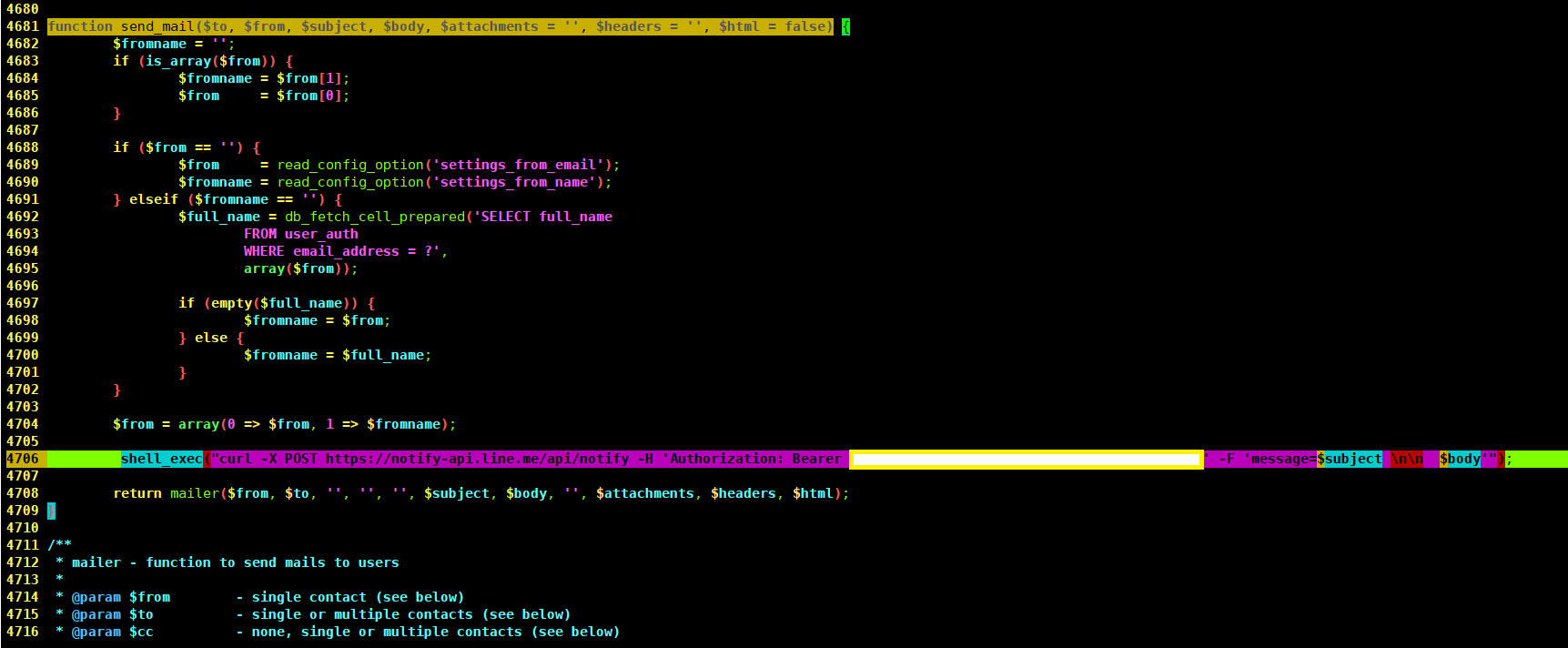
vi /var/www/html/cacti/lib/functions.php


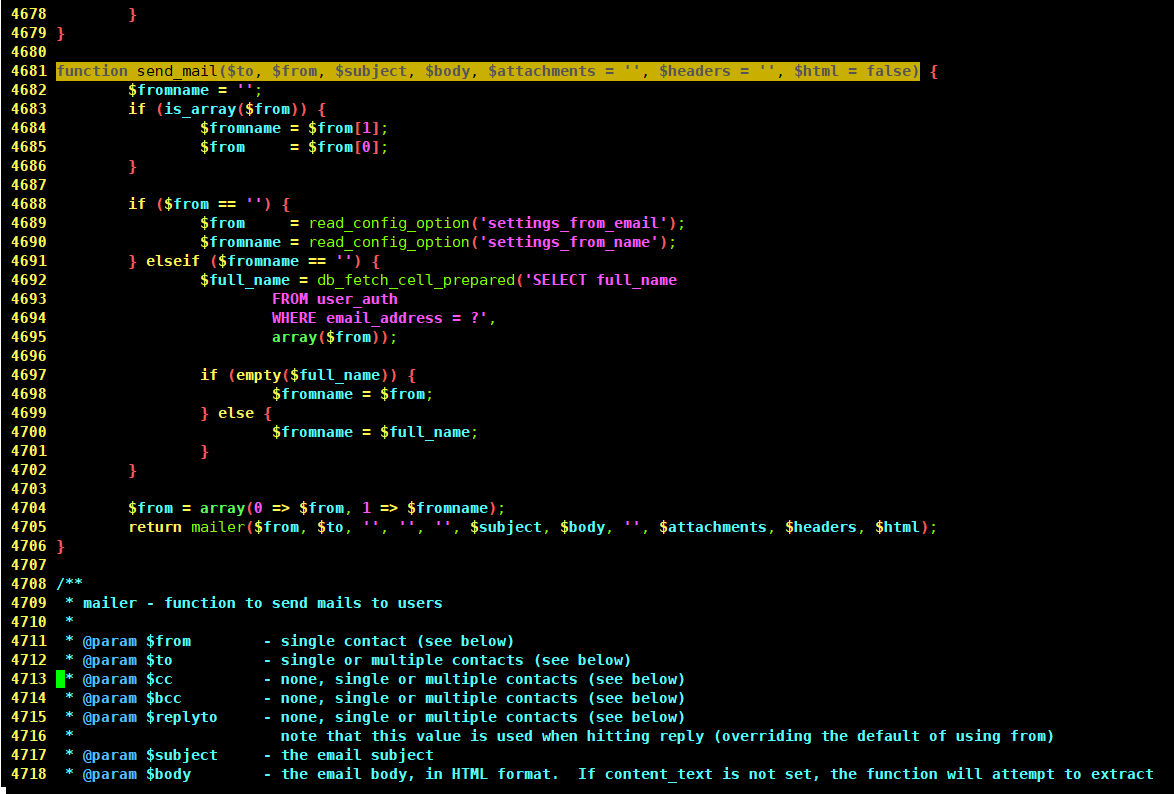
Row 4705 Insert :

 shell_exec("curl -X POST https://notify-api.line.me/api/notify -H 'Authorization: Bearer LineNotifyTokenXXXXXXXXXXXXXXXXXXXXXXXXXXXX' -F 'message=$subject \n\n  $body'");


Advanced DEMO