2023年2月27日 星期一

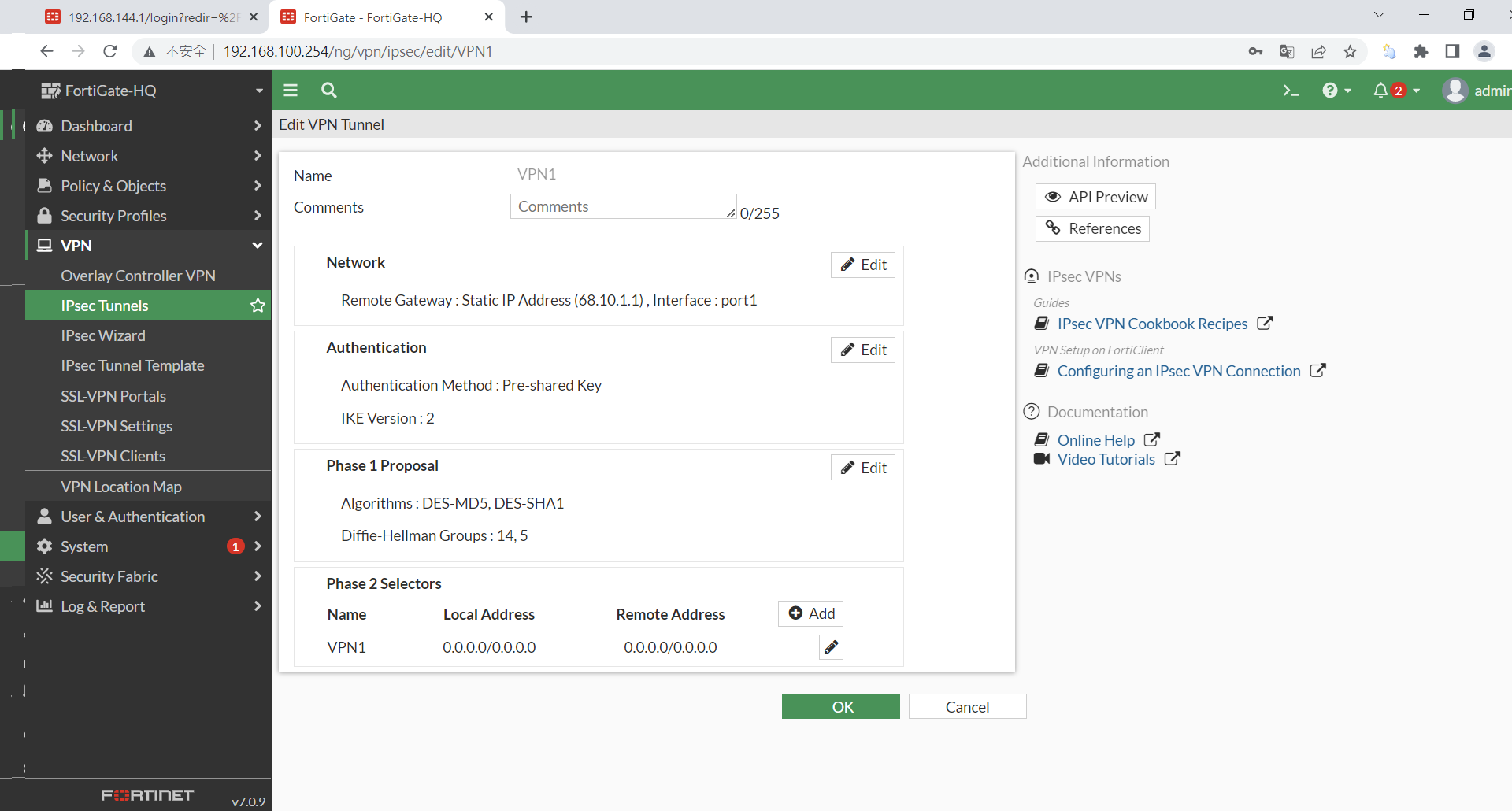
OSPF over IPsec for PaloAlto and FortiGate Firewall


Reference URL


MyLab PA SSH CLI History


admin@PA-VM> 
admin@PA-VM> ping source 192.168.1.2 host 192.168.1.1
PING 192.168.1.1 (192.168.1.1) from 192.168.1.2 : 56(84) bytes of data.
64 bytes from 192.168.1.1: icmp_seq=1 ttl=255 time=4.33 ms
64 bytes from 192.168.1.1: icmp_seq=2 ttl=255 time=1.65 ms
64 bytes from 192.168.1.1: icmp_seq=3 ttl=255 time=2.19 ms
^C
--- 192.168.1.1 ping statistics ---
3 packets transmitted, 3 received, 0% packet loss, time 2003ms
rtt min/avg/max/mdev = 1.650/2.726/4.331/1.156 ms
admin@PA-VM> 


admin@PA-VM> ping source 192.168.144.1 host 210.10.1.1
PING 210.10.1.1 (210.10.1.1) from 192.168.144.1 : 56(84) bytes of data.
64 bytes from 210.10.1.1: icmp_seq=1 ttl=254 time=1.99 ms
64 bytes from 210.10.1.1: icmp_seq=2 ttl=254 time=2.16 ms
^C
--- 210.10.1.1 ping statistics ---
2 packets transmitted, 2 received, 0% packet loss, time 1001ms
rtt min/avg/max/mdev = 1.990/2.076/2.162/0.086 ms


admin@PA-VM> ping source 192.168.144.1 host 192.168.100.10
PING 192.168.100.10 (192.168.100.10) from 192.168.144.1 : 56(84) bytes of data.
64 bytes from 192.168.100.10: icmp_seq=1 ttl=63 time=3.61 ms
64 bytes from 192.168.100.10: icmp_seq=2 ttl=63 time=1.45 ms
64 bytes from 192.168.100.10: icmp_seq=3 ttl=63 time=1.89 ms
^C
--- 192.168.100.10 ping statistics ---
3 packets transmitted, 3 received, 0% packet loss, time 2002ms
rtt min/avg/max/mdev = 1.457/2.322/3.615/0.931 ms

admin@PA-VM> traceroute source 192.168.144.1 host 192.168.100.10
traceroute to 192.168.100.10 (192.168.100.10), 30 hops max, 60 byte packets
 1  192.168.1.1 (192.168.1.1)  2.249 ms  2.255 ms  3.625 ms
 2  192.168.100.10 (192.168.100.10)  3.573 ms  3.596 ms  3.594 ms


admin@PA-VM> show routing protocol ospf neighbor

  Options: 0x80:reserved, O:Opaq-LSA capability, DC:demand circuits, EA:Ext-Attr LSA capability, 
           N/P:NSSA option, MC:multicase, E:AS external LSA capability, T:TOS capability
  ==========
  virtual router:                default
  neighbor address:              192.168.1.1
  local address binding:         0.0.0.0
  type:                          dynamic
  status:                        exchange start
  neighbor router ID:            192.168.1.1
  area id:                       0.0.0.0
  neighbor priority:             1
  lifetime remain:               32
  messages pending:              0
  LSA request pending:           0
  options:                       0x00
  hello suppressed:              no
  restart helper status:         not helping
  restart helper time remaining: 0
  restart helper exit reason:    none


admin@PA-VM> show routing protocol ospf summary 

  ==========
  router id:                     192.168.1.2
  virtual router:                default
  reject default route:          yes
  redist default route:          block
  spf calculation delay (sec):   5.00
  LSA interval timer (sec):      5.00
  RFC1583 behavior:              no
  area border router:            no
  AS border router:              yes
  LS type 5 count:               0
  LS type 11 count:              0
  LS sent count:                 6
  LS recv count:                 0
    area id:                     0.0.0.0
      interface:                 192.168.1.2
      interface:                 192.168.144.1
      dynamic neighbors:         
                                 IP 192.168.1.1 ID 192.168.1.1

admin@PA-VM> show routing protocol ospf neighbor

  Options: 0x80:reserved, O:Opaq-LSA capability, DC:demand circuits, EA:Ext-Attr LSA capability, 
           N/P:NSSA option, MC:multicase, E:AS external LSA capability, T:TOS capability
  ==========
  virtual router:                default
  neighbor address:              192.168.1.1
  local address binding:         0.0.0.0
  type:                          dynamic
  status:                        exchange start
  neighbor router ID:            192.168.1.1
  area id:                       0.0.0.0
  neighbor priority:             1
  lifetime remain:               32
  messages pending:              0
  LSA request pending:           0
  options:                       0x00
  hello suppressed:              no
  restart helper status:         not helping
  restart helper time remaining: 0
  restart helper exit reason:    none


admin@PA-VM> show routing route 

flags: A:active, ?:loose, C:connect, H:host, S:static, ~:internal, R:rip, O:ospf, B:bgp, 
       Oi:ospf intra-area, Oo:ospf inter-area, O1:ospf ext-type-1, O2:ospf ext-type-2, E:ecmp, M:multicast

  
VIRTUAL ROUTER: default (id 1)
  ==========
destination                                 nexthop                                 metric flags      age   interface          next-AS    
0.0.0.0/0                                   68.10.1.30                              10     A S              ethernet1/1                   
68.10.1.0/27                                68.10.1.1                               0      A C              ethernet1/1                   
68.10.1.1/32                                0.0.0.0                                 0      A H                                            
192.168.1.0/24                              0.0.0.0                                 10     A S              tunnel.1                      
192.168.1.0/30                              0.0.0.0                                 10       Oi       1402  tunnel.1                      
192.168.1.0/30                              192.168.1.2                             0      A C              tunnel.1                      
192.168.1.2/32                              0.0.0.0                                 0      A H                                            
192.168.100.0/24                            0.0.0.0                                 10     A S              tunnel.1                      
192.168.144.0/24                            0.0.0.0                                 10       Oi       1402  ethernet1/2                   
192.168.144.0/24                            192.168.144.1                           0      A C              ethernet1/2                   
192.168.144.1/32                            0.0.0.0                                 0      A H                                            
total routes shown: 11

admin@PA-VM> 


admin@PA-VM> show routing route

flags: A:active, ?:loose, C:connect, H:host, S:static, ~:internal, R:rip, O:ospf, B:bgp, 
       Oi:ospf intra-area, Oo:ospf inter-area, O1:ospf ext-type-1, O2:ospf ext-type-2, E:ecmp, M:multicast

  
VIRTUAL ROUTER: default (id 1)
  ==========
destination                                 nexthop                                 metric flags      age   interface          next-AS    
0.0.0.0/0                                   68.10.1.30                              10     A S              ethernet1/1                   
68.10.1.0/27                                68.10.1.1                               0      A C              ethernet1/1                   
68.10.1.1/32                                0.0.0.0                                 0      A H                                            
110.10.1.0/27                               192.168.1.1                             10     A O2       29    tunnel.1                      
192.168.1.0/24                              0.0.0.0                                 1      A ~                                            
192.168.1.0/30                              0.0.0.0                                 10       S              tunnel.1                      
192.168.1.0/30                              0.0.0.0                                 10       Oi       546   tunnel.1                      
192.168.1.0/30                              192.168.1.2                             0      A C              tunnel.1                      
192.168.1.1/32                              192.168.1.1                             10     A Oi       29    tunnel.1                      
192.168.1.2/32                              0.0.0.0                                 0      A H                                            
192.168.100.0/24                            0.0.0.0                                 10     A S              tunnel.1                      
192.168.100.0/24                            192.168.1.1                             11       Oi       29    tunnel.1                      
192.168.144.0/24                            0.0.0.0                                 1        ~                                            
192.168.144.0/24                            0.0.0.0                                 10       Oi       546   ethernet1/2                   
192.168.144.0/24                            192.168.144.1                           0      A C              ethernet1/2                   
192.168.144.1/32                            0.0.0.0                                 0      A H                                            
210.10.1.0/27                               192.168.1.1                             10     A O2       29    tunnel.1                      
total routes shown: 17

admin@PA-VM> 


2022年12月17日 星期六

winrm-cli (go language)

 https://go.dev/


wget https://go.dev/dl/go1.15.15.linux-amd64.tar.gz

tar -zvxf go1.15.15.linux-amd64.tar.gz

mv go /usr/local


ln -s /usr/local/go/bin/go /usr/bin/go

n -s /usr/local/go/bin/go /usr/local/bin/go

ln -s /usr/local/go/bin/godoc /usr/local/bin/godoc

ln -s /usr/local/go/bin/gofmt /usr/local/bin/gofmt

===========================

https://github.com/masterzen/winrm-cli

===========================


Building the winrm-cli executable

You can build winrm-cli from source:


git clone https://github.com/masterzen/winrm-cli

cd winrm-cli

make

This will generate a binary in the base directory called ./winrm.


Note: you need go 1.5+. Please check your installation with


go version

Command-line usage

Once built, you can run remote commands like this:


./winrm -hostname remote.domain.com -username "Administrator" -password "secret" "ipconfig /all"

============

My Lib Demo/Example


Rocky Linux setup a SIP Server

 OS : Rocky Linux 8.x

SIP Solution : kamailio (https://www.kamailio.org/w/)

Kamailio SIP Server Website : siremis (https://kb.asipto.com/siremis:index)


Topology


mobile phone =>4G---->Internet--->Firewall--->NAT-->rtpproxy/kamailio


===========================

 [root@rocky8 src]# yum info kamailio.x86_64

Last metadata expiration check: 0:08:20 ago on Sun 18 Dec 2022 01:52:43 PM CST.

Installed Packages

Name         : kamailio

Version      : 5.6.2

Release      : 0.el8.centos

Architecture : x86_64

Size         : 30 M

Source       : kamailio-5.6.2-0.el8.centos.src.rpm

Repository   : @System

From repo    : kamailio

Summary      : Kamailio - the Open Source SIP Server

URL          : http://kamailio.org/

License      : GPL-2.0

Description  : Kamailio is an Open Source SIP Server released under GPL, able

             : to handle thousands of call setups per second. Among features: asynchronous TCP,

             : UDP and SCTP, secure communication via TLS for VoIP (voice, video); IPv4 and

             : IPv6; SIMPLE instant messaging and presence with embedded XCAP server and MSRP

             : relay; ENUM; DID and least cost routing; load balancing; routing fail-over;

             : accounting, authentication and authorization; support for many backend systems

             : such as MySQL, Postgres, Oracle, Radius, LDAP, Redis, Cassandra; XMLRPC control

             : interface, SNMP monitoring. It can be used to build large VoIP servicing

             : platforms or to scale up SIP-to-PSTN gateways, PBX systems or media servers

             : like Asterisk™, FreeSWITCH™ or SEMS.


[root@rocky8 src]# 


yum install  kamailio kamailio-mysql kamailio-presence kamailio-ldap kamailio-debuginfo kamailio-xmpp kamailio-unixodbc kamailio-utils kamailio-gzcompress kamailio-tls kamailio-outbound


[root@rocky8 etc]#  kamdbctl create

MySQL password for root: 

INFO: test server charset

INFO: creating database kamailio ...

INFO: granting privileges to database kamailio ...

INFO: creating standard tables into kamailio ...

INFO: Core Kamailio tables successfully created.

Create the presence related tables? (y/n): y

INFO: creating presence tables into kamailio ...

INFO: Presence tables successfully created.

Create the tables for imc cpl siptrace domainpolicy carrierroute

drouting userblocklist htable purple uac pipelimit mtree sca mohqueue

rtpproxy rtpengine secfilter? (y/n): y

INFO: creating extra tables into kamailio ...

INFO: Extra tables successfully created.

Create the tables for uid_auth_db uid_avp_db uid_domain uid_gflags

uid_uri_db? (y/n): y

INFO: creating uid tables into kamailio ...

INFO: UID tables successfully created.

[root@rocky8 etc]# 


[root@rocky8 kamailio]# pwd
/etc/kamailio
[root@rocky8 kamailio]# ls -la
total 72
drwxr-xr-x    2 kamailio kamailio   108 Dec 18 11:55 .
drwxr-xr-x. 166 root     root     12288 Dec 18 08:41 ..
-rw-r--r--    1 root     root      1745 Oct  9 16:22 dictionary.kamailio
-rw-r--r--    1 root     root     26182 Dec 18 10:44 kamailio.cfg
-rw-r--r--    1 root     root      4280 Oct 21 22:02 kamctlrc
-rw-r--r--    1 root     root     10594 Oct  9 16:22 pi_framework.xml
-rw-r--r--    1 root     root      3343 Oct  9 16:22 tls.cfg
[root@rocky8 kamailio]# vi /etc/kamailio/kamailio.cfg


kamailio.cfg


#!KAMAILIO


#! define WITH_MYSQL
#! define WITH_AUTH
#! define WITH_USRLOCDB
#! define WITH_NAT


log_facility=LOG_LOCAL0


/* listen sockets - if none set, Kamailio binds to all local IP addresses
 * - basic prototype (full prototype can be found in Wiki - Core Cookbook):
 *      listen=[proto]:[localip]:[lport] advertise [publicip]:[pport]
 * - it can be set many times to add more sockets to listen to */
# listen=udp:10.0.0.10:5060


listen=udp:192.168.100.160:5060 advertise 114.35.xxx.xxx:5060


# ----- rtpproxy params -----
modparam("rtpproxy", "rtpproxy_sock", "udp:127.0.0.1:7722")


####### Routing Logic ########


/* Main SIP request routing logic
 * - processing of any incoming SIP request starts with this route
 * - note: this is the same as route { ... } */
request_route {


        add_local_rport();


================

[root@rocky8 kamailio]# vi /etc/kamailio/kamctlrc

 kamctlrc


## the SIP domain
# SIP_DOMAIN=kamailio.org

SIP_DOMAIN=114.35.XXX.XXX


## database type: MYSQL, PGSQL, ORACLE, DB_BERKELEY, DBTEXT, or SQLITE
## by default none is loaded
##
## If you want to setup a database with kamdbctl, you must at least specify
## this parameter.

DBENGINE=MYSQL

## database host

DBHOST=localhost

## database port

DBPORT=3306

## database name (for ORACLE this is TNS name)

DBNAME=kamailio

## database path used by dbtext, db_berkeley or sqlite
# DB_PATH="/usr/local/etc/kamailio/dbtext"

## database read/write user

DBRWUSER="kamailio"

## password for database read/write user

DBRWPW="kamailiorw"

## database read only user

DBROUSER="kamailioro"

## password for database read only user

DBROPW="kamailioro"

======================

 vi /etc/rsyslog.conf 


local0.*                                                /var/log/kamailio.log

==================

credit id & pwd :

kamctl add id pwd


example

kamctl add 1234 1234


Topology


SIP ---->Internet--->Firewall (FortiGate)--->NAT-->SIP Gateway


https://community.fortinet.com/t5/FortiGate/Technical-Tip-FortiGate-Hosted-NAT-Traversal-for-SIP/ta-p/197508


config voip profile

    edit "SIP-HNT"

        config sip  

                       set hosted-nat-traversal enable

                       set status enable

                       set rtp enable


2022年10月2日 星期日

ip nat outside source on Cisco / VyOS

References

https://deltaconfig.com/ip-nat-outside/

My Lab Setting 


Cisco 


csr1000v#sh run                  

Building configuration...


Current configuration : 1391 bytes

!

! Last configuration change at 08:55:23 TPE Sun Oct 2 2022 by cisco

!

version 15.5

service timestamps debug datetime localtime

service timestamps log datetime localtime

no platform punt-keepalive disable-kernel-core

platform console auto

!

hostname csr1000v

!

boot-start-marker

boot-end-marker

!

!

no aaa new-model

clock timezone TPE 8 0

!


subscriber templating

!

multilink bundle-name authenticated

!

!

!

license udi pid CSR1000V sn 9VRJUL4JW2V

license boot level ax

spanning-tree extend system-id

!

username cisco privilege 15 secret 5 $1$7wax$evNlQZGH2VorRL3bm/SRV0

!

redundancy

!

!

interface GigabitEthernet1

 ip address 192.168.1.1 255.255.255.252

 ip nat outside

 negotiation auto

!

interface GigabitEthernet2

 ip address 172.16.1.1 255.255.255.0

 ip nat inside

 negotiation auto

!

interface GigabitEthernet3

 ip address 192.168.100.10 255.255.255.0

 negotiation auto

!

!

virtual-service csr_mgmt

 ip shared host-interface GigabitEthernet1

!

ip nat outside source static 10.1.1.10 10.1.2.10

ip forward-protocol nd

!

no ip http server

ip http secure-server

ip route 0.0.0.0 0.0.0.0 192.168.1.2

ip route 10.1.2.10 255.255.255.255 10.1.1.10

!

!

snmp-server community cisco RO

!

!

control-plane

!

!

line con 0

 stopbits 1

line vty 0 4

 login local

 transport input ssh

!

ntp server 168.95.195.12

!

end


csr1000v# sh ip nat translations 

Pro  Inside global         Inside local          Outside local         Outside global

---  ---                   ---                   10.1.2.10             10.1.1.10             

tcp  172.16.1.10:47186     172.16.1.10:47186     10.1.2.10:22          10.1.1.10:22

Total number of translations: 2


csr1000v#


VyOS


vyos@VyOS-L3:~$ show configuration commands 

set interfaces ethernet eth0 address '192.168.1.1/30'

set interfaces ethernet eth0 hw-id '00:0c:29:14:49:e0'

set interfaces ethernet eth1 address '172.16.1.1/24'

set interfaces ethernet eth1 hw-id '00:0c:29:14:49:ea'

set interfaces ethernet eth2 address '192.168.100.10/24'

set interfaces ethernet eth2 hw-id '00:0c:29:14:49:f4'

set interfaces loopback lo

set nat destination rule 10 destination address '10.1.2.10'

set nat destination rule 10 inbound-interface 'eth1'

set nat destination rule 10 log 'enable'

set nat destination rule 10 translation address '10.1.1.10'

set protocols static route 0.0.0.0/0 next-hop 192.168.1.2

set service ssh port '22'

set system config-management commit-revisions '100'

set system conntrack modules ftp

set system conntrack modules h323

set system conntrack modules nfs

set system conntrack modules pptp

set system conntrack modules sip

set system conntrack modules sqlnet

set system conntrack modules tftp

set system console device ttyS0 speed '115200'

set system host-name 'VyOS-L3'

set system login user vyos authentication encrypted-password '$6$tBrkCg.1Y8NuExC$Ivwq8e7//904.UjhwRtz4/9edu6MTczLalZHJnk20fJbZZA2dhWkSo/H6yQ/GBdOST9eUJlpehJwj0COhq1Wp1'

set system login user vyos authentication plaintext-password ''

set system ntp server time1.vyos.net

set system ntp server time2.vyos.net

set system ntp server time3.vyos.net

set system syslog global facility all level 'info'

set system syslog global facility protocols level 'debug'


vyos@VyOS-L3:~$ show nat destination rules 

Disabled rules are not shown

Codes: X - exclude rule


rule    intf              translation                                               

----    ----              -----------                                               

10      eth1              daddr 10.1.2.10 to 10.1.1.10                              

        proto-all         dport ANY                                                     


vyos@VyOS-L3:~$ show nat destination statistics 

rule   pkts    bytes   interface   

----   ----    -----   ---------   

10     88      5304    eth1        


vyos@VyOS-L3:~$ show nat destination translations 

Pre-NAT              Post-NAT             Prot  Timeout 

10.1.2.10            10.1.1.10            tcp   431978  


vyos@VyOS-L3:~$ show log nat  

/var/log/messages:Oct  2 01:37:51 VyOS-L3 kernel: [ 1796.299962] [NAT-DST-10] IN=eth1 OUT= MAC=00:0c:29:14:49:ea:00:0c:29:7d:d6:23:08:00 SRC=172.16.1.10 DST=10.1.2.10 LEN=84 TOS=0x00 PREC=0x00 TTL=64 ID=47467 DF PROTO=ICMP TYPE=8 CODE=0 ID=4811 SEQ=1 

/var/log/messages:Oct  2 01:38:23 VyOS-L3 kernel: [ 1827.865467] [NAT-DST-10] IN=eth1 OUT= MAC=00:0c:29:14:49:ea:00:0c:29:7d:d6:23:08:00 SRC=172.16.1.10 DST=10.1.2.10 LEN=60 TOS=0x00 PREC=0x00 TTL=64 ID=64953 DF PROTO=TCP SPT=58076 DPT=22 WINDOW=64240 RES=0x00 SYN URGP=0


2022年9月24日 星期六

Configure site 2 site VPN with VyOS


References

https://docs.vyos.io/en/equuleus/configuration/vpn/site2site_ipsec.html

My Lab Setting 


vyos@vyos-a:~$ show configuration commands 

set firewall all-ping 'enable'

set firewall broadcast-ping 'disable'

set firewall config-trap 'disable'

set firewall group network-group INTERNAL_NETWORKS network '192.168.100.0/24'

set firewall ipv6-receive-redirects 'disable'

set firewall ipv6-src-route 'disable'

set firewall ip-src-route 'disable'

set firewall log-martians 'enable'

set firewall name OUTSIDE-LOCAL default-action 'drop'

set firewall name OUTSIDE-LOCAL rule 20 action 'accept'

set firewall name OUTSIDE-LOCAL rule 20 destination port '22'

set firewall name OUTSIDE-LOCAL rule 20 protocol 'tcp'

set firewall name OUTSIDE-LOCAL rule 20 source group network-group 'INTERNAL_NETWORKS'

set firewall name OUTSIDE-LOCAL rule 20 state established 'enable'

set firewall name OUTSIDE-LOCAL rule 20 state new 'enable'

set firewall name OUTSIDE-LOCAL rule 20 state related 'enable'

set firewall receive-redirects 'disable'

set firewall send-redirects 'enable'

set firewall source-validation 'disable'

set firewall syn-cookies 'enable'

set firewall twa-hazards-protection 'disable'

set interfaces ethernet eth0 address '192.168.100.168/24'

set interfaces ethernet eth0 firewall local name 'OUTSIDE-LOCAL'

set interfaces ethernet eth0 hw-id '00:0c:29:21:27:05'

set interfaces ethernet eth1 address '76.3.2.1/24'

set interfaces ethernet eth1 hw-id '00:0c:29:21:27:fb'

set interfaces loopback lo

set protocols static route 0.0.0.0/0 next-hop 192.168.100.1

set protocols static route 10.1.1.0/24 next-hop 76.3.2.254

set protocols static route 210.1.2.0/24 next-hop 76.3.2.254

set service ssh listen-address '192.168.100.168'

set service ssh port '22'

set system config-management commit-revisions '100'

set system conntrack modules ftp

set system conntrack modules h323

set system conntrack modules nfs

set system conntrack modules pptp

set system conntrack modules sip

set system conntrack modules sqlnet

set system conntrack modules tftp

set system console device ttyS0 speed '115200'

set system host-name 'vyos-a'

set system login user vyos authentication encrypted-password 

set system login user vyos authentication plaintext-password 

set system ntp server time1.vyos.net

set system ntp server time2.vyos.net

set system ntp server time3.vyos.net

set system syslog global facility all level 'info'

set system syslog global facility protocols level 'debug'

set vpn ipsec esp-group IPSEC-PROPOSAL compression 'disable'

set vpn ipsec esp-group IPSEC-PROPOSAL lifetime '14400'

set vpn ipsec esp-group IPSEC-PROPOSAL mode 'tunnel'

set vpn ipsec esp-group IPSEC-PROPOSAL pfs 'disable'

set vpn ipsec esp-group IPSEC-PROPOSAL proposal 1 encryption 'aes256'

set vpn ipsec esp-group IPSEC-PROPOSAL proposal 1 hash 'sha1'

set vpn ipsec ike-group IKE-PROPOSAL close-action 'none'

set vpn ipsec ike-group IKE-PROPOSAL ikev2-reauth 'no'

set vpn ipsec ike-group IKE-PROPOSAL key-exchange 'ikev1'

set vpn ipsec ike-group IKE-PROPOSAL lifetime '14400'

set vpn ipsec ike-group IKE-PROPOSAL proposal 1 dh-group '2'

set vpn ipsec ike-group IKE-PROPOSAL proposal 1 encryption 'aes256'

set vpn ipsec ike-group IKE-PROPOSAL proposal 1 hash 'sha256'

set vpn ipsec ipsec-interfaces interface 'eth1'

set vpn ipsec site-to-site peer 210.1.2.1 authentication mode 'pre-shared-secret'

set vpn ipsec site-to-site peer 210.1.2.1 authentication pre-shared-secret 'vyos'

set vpn ipsec site-to-site peer 210.1.2.1 connection-type 'initiate'

set vpn ipsec site-to-site peer 210.1.2.1 ike-group 'IKE-PROPOSAL'

set vpn ipsec site-to-site peer 210.1.2.1 ikev2-reauth 'inherit'

set vpn ipsec site-to-site peer 210.1.2.1 local-address '76.3.2.1'

set vpn ipsec site-to-site peer 210.1.2.1 tunnel 1 allow-nat-networks 'disable'

set vpn ipsec site-to-site peer 210.1.2.1 tunnel 1 allow-public-networks 'disable'

set vpn ipsec site-to-site peer 210.1.2.1 tunnel 1 esp-group 'IPSEC-PROPOSAL'

set vpn ipsec site-to-site peer 210.1.2.1 tunnel 1 local prefix '192.168.100.0/24'

set vpn ipsec site-to-site peer 210.1.2.1 tunnel 1 remote prefix '10.1.1.0/24'

==============================

vyos@vyos-b:~$ show configuration commands 

set firewall all-ping 'enable'

set firewall broadcast-ping 'disable'

set firewall config-trap 'disable'

set firewall group network-group INTERNAL_NETWORKS network '192.168.100.0/24'

set firewall group network-group INTERNAL_NETWORKS network '10.1.1.0/24'

set firewall ipv6-receive-redirects 'disable'

set firewall ipv6-src-route 'disable'

set firewall ip-src-route 'disable'

set firewall log-martians 'enable'

set firewall name OUTSIDE-LOCAL default-action 'drop'

set firewall name OUTSIDE-LOCAL rule 20 action 'accept'

set firewall name OUTSIDE-LOCAL rule 20 destination port '22'

set firewall name OUTSIDE-LOCAL rule 20 protocol 'tcp'

set firewall name OUTSIDE-LOCAL rule 20 source group network-group 'INTERNAL_NETWORKS'

set firewall name OUTSIDE-LOCAL rule 20 state established 'enable'

set firewall name OUTSIDE-LOCAL rule 20 state new 'enable'

set firewall name OUTSIDE-LOCAL rule 20 state related 'enable'

set firewall receive-redirects 'disable'

set firewall send-redirects 'enable'

set firewall source-validation 'disable'

set firewall syn-cookies 'enable'

set firewall twa-hazards-protection 'disable'

set interfaces ethernet eth0 address '10.1.1.168/24'

set interfaces ethernet eth0 firewall local name 'OUTSIDE-LOCAL'

set interfaces ethernet eth0 hw-id '00:0c:29:f9:dd:95'

set interfaces ethernet eth1 address '210.1.2.1/24'

set interfaces ethernet eth1 hw-id '00:0c:29:f9:dd:9f'

set interfaces loopback lo

set protocols static route 0.0.0.0/0 next-hop 210.1.2.254


set service ssh listen-address '10.1.1.168'

set service ssh port '22'

set system config-management commit-revisions '100'

set system conntrack modules ftp

set system conntrack modules h323

set system conntrack modules nfs

set system conntrack modules pptp

set system conntrack modules sip

set system conntrack modules sqlnet

set system conntrack modules tftp

set system console device ttyS0 speed '115200'

set system host-name 'vyos-b'

set system login user vyos authentication encrypted-password 

set system login user vyos authentication plaintext-password 

set system ntp server time1.vyos.net

set system ntp server time2.vyos.net

set system ntp server time3.vyos.net

set system syslog global facility all level 'info'

set system syslog global facility protocols level 'debug'

set vpn ipsec esp-group IPSEC-PROPOSAL compression 'disable'

set vpn ipsec esp-group IPSEC-PROPOSAL lifetime '14400'

set vpn ipsec esp-group IPSEC-PROPOSAL mode 'tunnel'

set vpn ipsec esp-group IPSEC-PROPOSAL pfs 'disable'

set vpn ipsec esp-group IPSEC-PROPOSAL proposal 1 encryption 'aes256'

set vpn ipsec esp-group IPSEC-PROPOSAL proposal 1 hash 'sha1'

set vpn ipsec ike-group IKE-PROPOSAL close-action 'none'

set vpn ipsec ike-group IKE-PROPOSAL ikev2-reauth 'no'

set vpn ipsec ike-group IKE-PROPOSAL key-exchange 'ikev1'

set vpn ipsec ike-group IKE-PROPOSAL lifetime '14400'

set vpn ipsec ike-group IKE-PROPOSAL proposal 1 dh-group '2'

set vpn ipsec ike-group IKE-PROPOSAL proposal 1 encryption 'aes256'

set vpn ipsec ike-group IKE-PROPOSAL proposal 1 hash 'sha256'

set vpn ipsec ipsec-interfaces interface 'eth1'

set vpn ipsec site-to-site peer 76.3.2.1 authentication mode 'pre-shared-secret'

set vpn ipsec site-to-site peer 76.3.2.1 authentication pre-shared-secret 'vyos'

set vpn ipsec site-to-site peer 76.3.2.1 connection-type 'initiate'

set vpn ipsec site-to-site peer 76.3.2.1 ike-group 'IKE-PROPOSAL'

set vpn ipsec site-to-site peer 76.3.2.1 ikev2-reauth 'inherit'

set vpn ipsec site-to-site peer 76.3.2.1 local-address '210.1.2.1'

set vpn ipsec site-to-site peer 76.3.2.1 tunnel 1 allow-nat-networks 'disable'

set vpn ipsec site-to-site peer 76.3.2.1 tunnel 1 allow-public-networks 'disable'

set vpn ipsec site-to-site peer 76.3.2.1 tunnel 1 esp-group 'IPSEC-PROPOSAL'

set vpn ipsec site-to-site peer 76.3.2.1 tunnel 1 local prefix '10.1.1.0/24'

set vpn ipsec site-to-site peer 76.3.2.1 tunnel 1 remote prefix '192.168.100.0/24'


===========================

vyos@vyos-a:~$ show vpn ike sa

Peer ID / IP                            Local ID / IP               

------------                            -------------

210.1.2.1                             76.3.2.1                               


    State  IKEVer  Encrypt  Hash    D-H Group      NAT-T  A-Time  L-Time

    -----  ------  -------  ----    ---------      -----  ------  ------

    up     IKEv1   aes256   sha256_128 2(MODP_1024)   no     3600    14400  


vyos@vyos-a:~$ show vpn ipsec sa

Connection                 State    Uptime    Bytes In/Out    Packets In/Out    Remote address    Remote ID    Proposal

-------------------------  -------  --------  --------------  ----------------  ----------------  -----------  ------------------------

peer-210.1.2.1-tunnel-1  up       16m22s    23K/20K         194/282           210.1.2.1       N/A          AES_CBC_256/HMAC_SHA1_96


vyos@vyos-a:~$ show arp 

Address                  HWtype  HWaddress           Flags Mask            Iface

192.168.100.1            ether   c8:3a:35:23:eb:c8   C                     eth0

192.168.100.40           ether   70:85:c2:6a:8d:d9   C                     eth0

76.1.1.254               ether   00:0c:29:14:49:e0   C                     eth1

vyos@vyos-a:~$ 


========================================

vyos@vyos-b:~$ show vpn ike sa 

Peer ID / IP                            Local ID / IP               

------------                            -------------

76.3.2.1                                210.1.2.1                            


    State  IKEVer  Encrypt  Hash    D-H Group      NAT-T  A-Time  L-Time

    -----  ------  -------  ----    ---------      -----  ------  ------

    up     IKEv1   aes256   sha256_128 2(MODP_1024)   no     3600    14400  


vyos@vyos-b:~$ show vpn ipsec sa

Connection              State    Uptime    Bytes In/Out    Packets In/Out    Remote address    Remote ID    Proposal

----------------------  -------  --------  --------------  ----------------  ----------------  -----------  ------------------------

peer-76.3.2.1-tunnel-1  up       14m45s    20K/23K         279/191           76.3.2.1          N/A          AES_CBC_256/HMAC_SHA1_96

vyos@vyos-b:~$ 


vyos@vyos-b:~$ sh arp 

Address                  HWtype  HWaddress           Flags Mask            Iface

210.69.8.254             ether   00:0c:29:14:49:ea   C                     eth1

10.1.1.10                ether   00:0c:29:7d:d6:23   C                     eth0

vyos@vyos-b:~$ 


2022年7月15日 星期五

將 Oxidized 外掛上 Librenms

 最近又有人在問我如何做 Cisco 或 FortiGate 設定組態 (configuration)

如何自動備份?

N年前我就有寫過類似的東西,只不過在當時我是用 Perl + telnet DIY小程式去做.

當然也是改成 Perl + ssh DIY 的小程式去做.但 N 年過去了,

目前已有太多工具可以逹成這個目地.

接下來的筆記是記錄,我是如何透過 Oxidized  去做這件事,

順便將其整合進 LibreNMS內,

當然只使用 Oxidized 也是 OK 的.

參考文件

http://blog.jason.tools/2021/02/librenms-oxidized.html

官方 URL

https://docs.librenms.org/Extensions/Oxidized/

https://github.com/ytti/oxidized

之前寫的東西

http://xrcd2.blogspot.com/2013/02/cisco-show-run-config-perl.html

自動備份 cisco 設備 show run 的 config ( 使用 perl )

http://xrcd2.blogspot.com/2016/01/cisco-ios-configuration-cisco-config.html

Cisco IOS 設備 configuration 自動版本管理的方式 ( cisco config auto 2 svn )

------------------------------------------------------------------------

安裝 Oxidized (OS CentOS 7.9)

yum install -y centos-release-scl-rh

yum install -y rh-ruby24 rh-ruby24-ruby-devel

yum install make cmake which sqlite-devel openssl-devel libssh2-devel ruby gcc ruby-devel libicu-devel gcc-c++

scl enable rh-ruby24 bash

Install the gems: 

gem install oxidized oxidized-web

===============
git 設定

git config --global user.name "cisco"
git config --global user.email "cisco@cisco.lab.local"

===============

[root@centos7 ~]# pwd
/root
[root@centos7 ~]# 

[root@centos7 ~]# oxidized
edit ~/.config/oxidized/config
[root@centos7 ~]# oxidized
edit ~/.config/oxidized/router.db 

設定檔參考如下:

[root@centos7 oxidized]# pwd
/root/.config/oxidized
[root@centos7 oxidized]# cat config
---
username: username
password: password
model: ios
resolve_dns: false
interval: 300
log: /root/.config/oxidized/logs/oxidized.log
use_syslog: false
debug: false
threads: 30
timeout: 20
retries: 3
prompt: !ruby/regexp /^([\w.@-]+[#>]\s?)$/
rest: 192.168.100.105:8888
next_adds_job: false
vars: {}
groups: {}
models: {}
pid: "/root/.config/oxidized/pid"
crash:
  directory: "/root/.config/oxidized/crashes"
  hostnames: false
stats:
  history_size: 10
input:
  default: ssh, telnet
  debug: false
  ssh:
    secure: false
  ftp:
    passive: true
  utf8_encoded: true
output:
  default: git
  git:
    user: cisco
    email: cisco@cisco.lab.local
    repo: "/root/.config/oxidized/configs/configs.git"
source:
  default: csv
  csv:
    file: "/root/.config/oxidized/router.db"
    delimiter: !ruby/regexp /:/
    map:
      name: 0
      model: 1
      ip: 2
      username: 3
      password: 4
      group: 5
    gpg: false
model_map:
  juniper: junos
  cisco: ios
============================
[root@centos7 oxidized]# cat router.db 

csr1000v:ios:192.168.100.222:cisco:cisco:configs

[root@centos7 oxidized]# 

=============================
整合進 librenms
===================

[root@centos7 oxidized]# su - librenms
Last login: Sat Jul 16 12:39:31 CST 2022 on pts/0
-bash-4.2$ lnms config:set oxidized.enabled true
-bash-4.2$ lnms config:set oxidized.url http://192.168.100.105:8888
-bash-4.2$ lnms config:set oxidized.features.versioning true
-bash-4.2$ lnms config:set oxidized.group_support true
-bash-4.2$ lnms config:set oxidized.default_group default
-bash-4.2$ lnms config:set oxidized.reload_nodes true
-bash-4.2$ 


=======================
Cisco CSR 1000v  show run 
==================

csr1000v#sh run 
Building configuration...

Current configuration : 1204 bytes
!
! Last configuration change at 13:29:30 TPE Sat Jul 16 2022 by cisco
!
version 15.5
service timestamps debug datetime localtime
service timestamps log datetime localtime
no platform punt-keepalive disable-kernel-core
platform console auto
!
hostname csr1000v
!
boot-start-marker
boot-end-marker
!
!
!
no aaa new-model
clock timezone TPE 8 0
!
!
!
!
!
!
!
!
!


!
!
!
!
!
!
!
!
!
!         
subscriber templating
!
multilink bundle-name authenticated
!
!
!
license udi pid CSR1000V sn XXXXXXXXXXXXX
license boot level ax
spanning-tree extend system-id
!
username cisco privilege 15 secret 5 $1$7wax$evNlQZGH2VorRL3bm/SRV0
!
redundancy
!
!
!
!
!
!
! 
!
!
!
!
!
!
!
!
!
!
!
!
! 
! 
!
interface GigabitEthernet1
 ip address 192.168.100.222 255.255.255.0
 negotiation auto
!
interface GigabitEthernet2
 no ip address
 shutdown
 negotiation auto
!
interface GigabitEthernet3
 no ip address
 shutdown
 negotiation auto
!
!
virtual-service csr_mgmt
 ip shared host-interface GigabitEthernet1
!
ip forward-protocol nd
!
no ip http server
ip http secure-server
!
!
snmp-server community cisco RO
!
!
control-plane
!
!
line con 0
 stopbits 1
line vty 0 4
 login local
 transport input ssh
!
ntp server 168.95.195.12
!
end

csr1000v# 

=====================

將  oxidized 設定成服務

====================

vi /etc/profile.d/rh-ruby24.sh
#!/bin/bash
source /opt/rh/rh-ruby24/enable
export X_SCLS="`scl enable rh-ruby24 'echo $X_SCLS'`"
export PATH=$PATH:/opt/rh/rh-ruby24/root/usr/bin/ruby


ln -s /opt/rh/rh-ruby24/root/usr/local/bin/oxidized /usr/local/bin/oxidized


====================


vi  /lib/systemd/system/oxidized.service
 
# /lib/systemd/system/oxidized.service
[Unit]
Description=Oxidized - Network Device Configuration Backup Tool
After=network-online.target multi-user.target
Wants=network-online.target
 
[Service]
ExecStart=/usr/local/bin/oxidized
KillSignal=SIGKILL
User=root
 
[Install]
WantedBy=multi-user.target


===========================

 
chmod +x /lib/systemd/system/oxidized.service
 
vi /etc/ld.so.conf

#增加 /opt/rh/rh-ruby24/root/usr/lib64
 
ldconfig
ldconfig -v

#檢查 ruby ldconf
 
chmod +x /lib/systemd/system/oxidized.service
 
systemctl enable oxidized.service
systemctl start oxidized.service
systemctl status oxidized.service


====================

Demo


2022年6月2日 星期四

CentOS 7 安裝 NGINX ModSecurity WAF 筆記

 [root@centos7 yum.repos.d]# vi epel.repo 

[epel]

name=Extra Packages for Enterprise Linux 7 - $basearch

#baseurl=http://download.fedoraproject.org/pub/epel/7/$basearch

metalink=https://mirrors.fedoraproject.org/metalink?repo=epel-7&arch=$basearch

failovermethod=priority

enabled=1

gpgcheck=1

gpgkey=file:///etc/pki/rpm-gpg/RPM-GPG-KEY-EPEL-7


[epel-debuginfo]

name=Extra Packages for Enterprise Linux 7 - $basearch - Debug

#baseurl=http://download.fedoraproject.org/pub/epel/7/$basearch/debug

metalink=https://mirrors.fedoraproject.org/metalink?repo=epel-debug-7&arch=$basearch

failovermethod=priority

enabled=0

gpgkey=file:///etc/pki/rpm-gpg/RPM-GPG-KEY-EPEL-7

gpgcheck=1


[epel-source]

name=Extra Packages for Enterprise Linux 7 - $basearch - Source

#baseurl=http://download.fedoraproject.org/pub/epel/7/SRPMS

metalink=https://mirrors.fedoraproject.org/metalink?repo=epel-source-7&arch=$basearch

failovermethod=priority

enabled=0

gpgkey=file:///etc/pki/rpm-gpg/RPM-GPG-KEY-EPEL-7

gpgcheck=1


====================================

[root@centos7 /]# vi /etc/yum.repos.d/nginx.repo 

[nginx-stable]

name=nginx stable repo

baseurl=http://nginx.org/packages/centos/$releasever/$basearch/

gpgcheck=1

enabled=1

gpgkey=https://nginx.org/keys/nginx_signing.key

module_hotfixes=true


[nginx-mainline]

name=nginx mainline repo

baseurl=http://nginx.org/packages/mainline/centos/$releasever/$basearch/

gpgcheck=1

enabled=0

gpgkey=https://nginx.org/keys/nginx_signing.key

module_hotfixes=true


======================================

[root@centos7 yum.repos.d]# vi remi.repo 


# Repository: http://rpms.remirepo.net/

# Blog:       http://blog.remirepo.net/

# Forum:      http://forum.remirepo.net/


[remi]

name=Remi's RPM repository for Enterprise Linux 7 - $basearch

#baseurl=http://rpms.remirepo.net/enterprise/7/remi/$basearch/

#mirrorlist=https://rpms.remirepo.net/enterprise/7/remi/httpsmirror

mirrorlist=http://cdn.remirepo.net/enterprise/7/remi/mirror

enabled=1

gpgcheck=1

gpgkey=file:///etc/pki/rpm-gpg/RPM-GPG-KEY-remi


[remi-php55]

name=Remi's PHP 5.5 RPM repository for Enterprise Linux 7 - $basearch

#baseurl=http://rpms.remirepo.net/enterprise/7/php55/$basearch/

#mirrorlist=https://rpms.remirepo.net/enterprise/7/php55/httpsmirror

mirrorlist=http://cdn.remirepo.net/enterprise/7/php55/mirror

# NOTICE: common dependencies are in "remi-safe"

enabled=1

gpgcheck=1

gpgkey=file:///etc/pki/rpm-gpg/RPM-GPG-KEY-remi


=================================

參考 URL


https://github.com/SpiderLabs/ModSecurity/


https://github.com/SpiderLabs/ModSecurity-nginx


https://github.com/SpiderLabs/owasp-modsecurity-crs


===================================


cd /opt

git clone https://github.com/SpiderLabs/ModSecurity

cd ModSecurity

git checkout -b v3/master origin/v3/master

sh build.sh

git submodule init

git submodule update

./configure

make

make install

cd ..

git clone https://github.com/SpiderLabs/ModSecurity-nginx.git modsecurity-nginx

wget https://nginx.org/download/nginx-1.22.0.tar.gz

tar -zvxf nginx-1.22.0.tar.gz 

cd nginx-1.22.0/


build a dynamic module


./configure --with-compat --add-dynamic-module=/opt/modsecurity-nginx

make modules

cd objs/

cp ngx_http_modsecurity_module.so /etc/nginx/modules/

cp /opt/ModSecurity/modsecurity.conf-recommended /etc/nginx/modsecurity.conf

在 /etc/nginx/nginx.conf 放入 load_module

load_module modules/ngx_http_modsecurity_module.so;

在 /etc/nginx/conf.d/default.conf(或其他 ) 的 server 內放 

    modsecurity on;

    modsecurity_rules_file /etc/nginx/modsecurity.conf;


===========================

cp /opt/ModSecurity/unicode.mapping /etc/nginx

sed -ie 's/SecRuleEngine DetectionOnly/SecRuleEngine On/g' /etc/nginx/modsecurity.conf


安裝 OWASP  rules

cd /opt

git clone https://github.com/SpiderLabs/owasp-modsecurity-crs.git

cd /opt/owasp-modsecurity-crs/rules

[root@centos7 rules]# pwd

/opt/owasp-modsecurity-crs/rules

cat *.conf > /etc/nginx/csr.conf

cp /opt/owasp-modsecurity-crs/crs-setup.conf.example /etc/nginx/crs-setup.conf

cd /etc/nginx 

cat modsecurity.conf crs-setup.conf csr.conf > rules.conf

 cp *.data  /etc/nginx/


======================

[root@centos7 conf.d]# cat /etc/nginx/nginx.conf 


user  nginx;

worker_processes  auto;


error_log  /var/log/nginx/error.log notice;

pid        /var/run/nginx.pid;


load_module modules/ngx_http_modsecurity_module.so;


events {

    worker_connections  1024;

}


http {

    include       /etc/nginx/mime.types;

    default_type  application/octet-stream;


    log_format  main  '$remote_addr - $remote_user [$time_local] "$request" '

                      '$status $body_bytes_sent "$http_referer" '

                      '"$http_user_agent" "$http_x_forwarded_for"';


    access_log  /var/log/nginx/access.log  main;


    sendfile        on;

    #tcp_nopush     on;


    keepalive_timeout  65;


    #gzip  on;


    include /etc/nginx/conf.d/*.conf;

}

[root@centos7 conf.d]# 


===========================


[root@centos7 conf.d]# cat default.conf 

server {

    listen       80;

    server_name  localhost;

    modsecurity on;

    modsecurity_rules_file /etc/nginx/modsecurity.conf;

    # or  use OWASP  rules modsecurity_rules_file /etc/nginx/rules.conf;

    #access_log  /var/log/nginx/host.access.log  main;


    location / {

        root   /usr/share/nginx/html;

        index  index.html index.htm;


        #modsecurity_rules_file rules.conf;


    }


    #error_page  404              /404.html;


    # redirect server error pages to the static page /50x.html

    #

    error_page   500 502 503 504  /50x.html;

    location = /50x.html {

        root   /usr/share/nginx/html;

    }


    # proxy the PHP scripts to Apache listening on 127.0.0.1:80

    #

    #location ~ \.php$ {

    #    proxy_pass   http://127.0.0.1;

    #}


    # pass the PHP scripts to FastCGI server listening on 127.0.0.1:9000

    #

    location ~ \.php$ {

        root           /usr/share/nginx/html;

        fastcgi_pass   127.0.0.1:9000;

        fastcgi_index  index.php;

        #fastcgi_param  SCRIPT_FILENAME  /scripts$fastcgi_script_name;

fastcgi_param  SCRIPT_FILENAME $document_root$fastcgi_script_name;  

        include        fastcgi_params;

    }


    # deny access to .htaccess files, if Apache's document root

    # concurs with nginx's one

    #

    #location ~ /\.ht {

    #    deny  all;

    #}

}


[root@centos7 conf.d]# 


vi /etc/php.ini


; cgi.fix_pathinfo provides *real* PATH_INFO/PATH_TRANSLATED support for CGI.  PHP's

; http://php.net/cgi.fix-pathinfo

;cgi.fix_pathinfo=1

cgi.fix_pathinfo=0


vi /etc/php-fpm.d/www.conf 


; RPM: apache user chosen to provide access to the same directories as httpd

user = nginx

; RPM: Keep a group allowed to write in log dir.

group = nginx


vi /etc/nginx/conf.d/default.conf


    location ~ \.php$ {

        root           /usr/share/nginx/html;

        fastcgi_pass   127.0.0.1:9000;

        fastcgi_index  index.php;

        #fastcgi_param  SCRIPT_FILENAME  /scripts$fastcgi_script_name;

        fastcgi_param  SCRIPT_FILENAME $document_root$fastcgi_script_name;

        include        fastcgi_params;

    }